
Suppose that a quantity has been measured at orientations \(\mathtt{ori}_m\), with one value \(v_m\) at each orientation. The task is to replace those samples by a function that can be evaluated and plotted at any orientation. MTEX calls this operation interp, although the fitted function need not pass through every sample exactly.
The values may be an orientation distribution function (ODF), such as volume fractions measured at different orientations. They may instead be any scalar physical property that depends on orientation. This distinction determines whether the fitted function must be nonnegative and have mean 1.
plottingConvention.default('y↑→x');Importing the samples
An ASCII file can contain one orientation and one or more measured values per row. orientation.load needs the columns of the Euler angles and the names of the additional columns.
fname = fullfile(mtexDataPath, 'orientation', 'dubna.csv');
[ori, S] = orientation.load(fname, ...
  'columnNames',{'phi1','Phi','phi2','values'});
The result ori contains the sample orientations. The struct S has one field for every additional column, so the values in this file are available as S.values.
plotSection(ori,S.values,'all','sigma');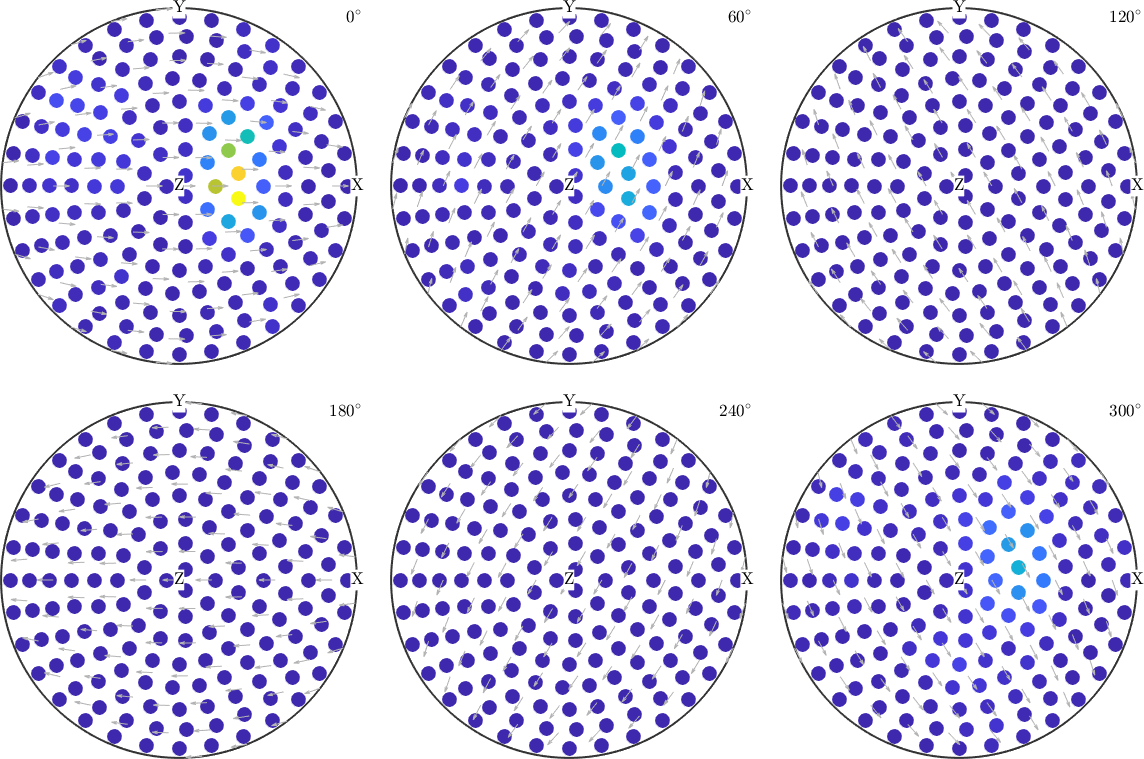
Each marker in the section plot is one sample, and its colour is the corresponding value. Notice the isolated high-value regions and the large areas with values close to zero. A useful approximation should retain those regions without introducing unsupported oscillations.
Choosing an approximation
Approximation finds a function that agrees reasonably well with the data. Interpolation is the special case in which it agrees exactly at the sample orientations. Noise, incomplete sampling, or regularization often makes approximation the more useful goal.
interp provides three approximation schemes:
- A harmonic expansion is a global series model. Prefer it for a general orientation-dependent relationship, especially with many nodes, outliers, or noise.
- A radial-basis-function (RBF) model is a weighted sum of kernels centred on a grid. Prefer it for an ODF with a low or medium number of nodes, and use
'density'when nonnegativity and mean 1 are required. - A Bingham distribution is a compact parametric density model. Use it only when one Bingham-shaped component is physically appropriate.
These are starting points rather than rules. In practice, compare the computational cost and the fitted shapes from both harmonic and RBF models. The residual at the samples is useful, but it cannot by itself reveal oscillations or overfitting between them.
Harmonic approximation
The flag 'harmonic' selects a harmonic expansion. Internally, interp calls SO3FunHarmonic.interpolate. The default fit includes regularization, which suppresses rapidly varying harmonic coefficients.
SO3FReg = interp(ori,S.values,'harmonic')
relativeErrorReg = norm(SO3FReg.eval(ori) - S.values) / norm(S.values)

plot(SO3FReg,'sigma')
SO3FReg = SO3FunHarmonic (1 → y↑→x)
bandwidth: 18
weight: 1
relativeErrorReg =
0.0463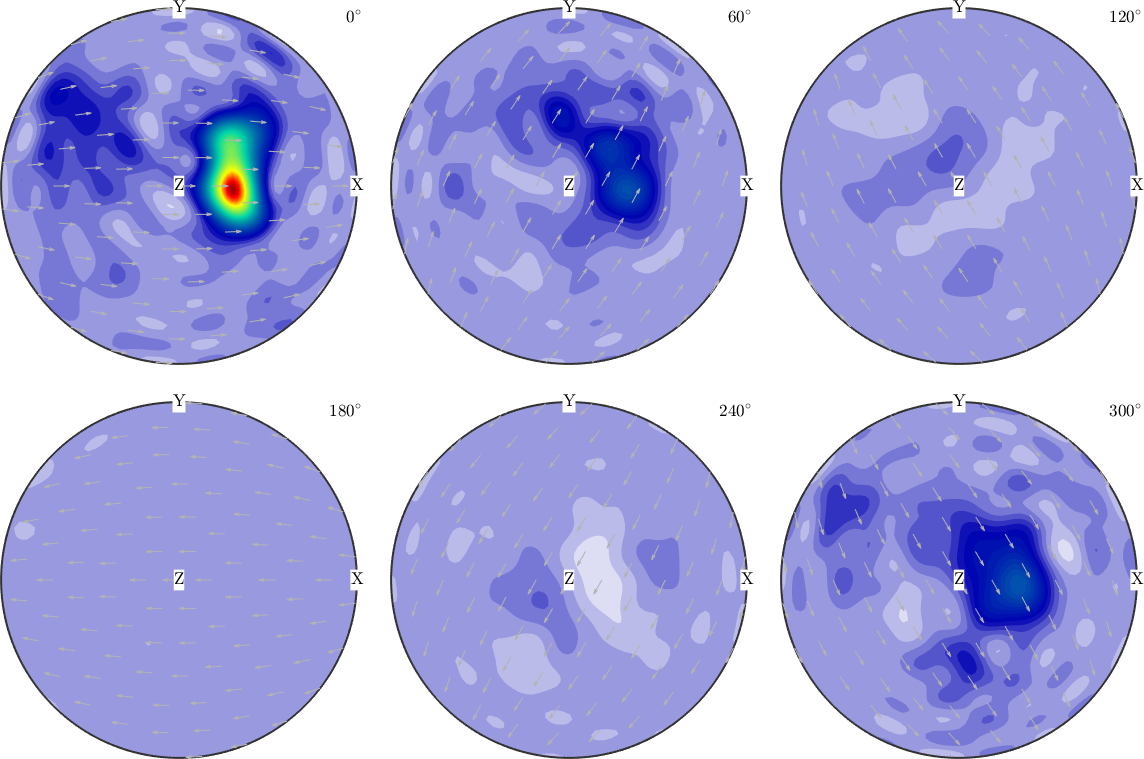
Compare this plot with the discrete samples. The strongest regions remain in the same sections, and the fit fills the space between the samples with a smooth function.
The default regularization parameter is \(\lambda=10^{-8}\). Setting it to zero switches regularization off and asks the harmonic model to follow the samples more closely.
SO3FUnreg = interp(ori,S.values,'harmonic','regularization',0)
relativeErrorUnreg = ...
  norm(SO3FUnreg.eval(ori) - S.values) / norm(S.values)

plot(SO3FUnreg,'sigma')
SO3FUnreg = SO3FunHarmonic (1 → y↑→x)
bandwidth: 18
weight: 1
relativeErrorUnreg =
0.0463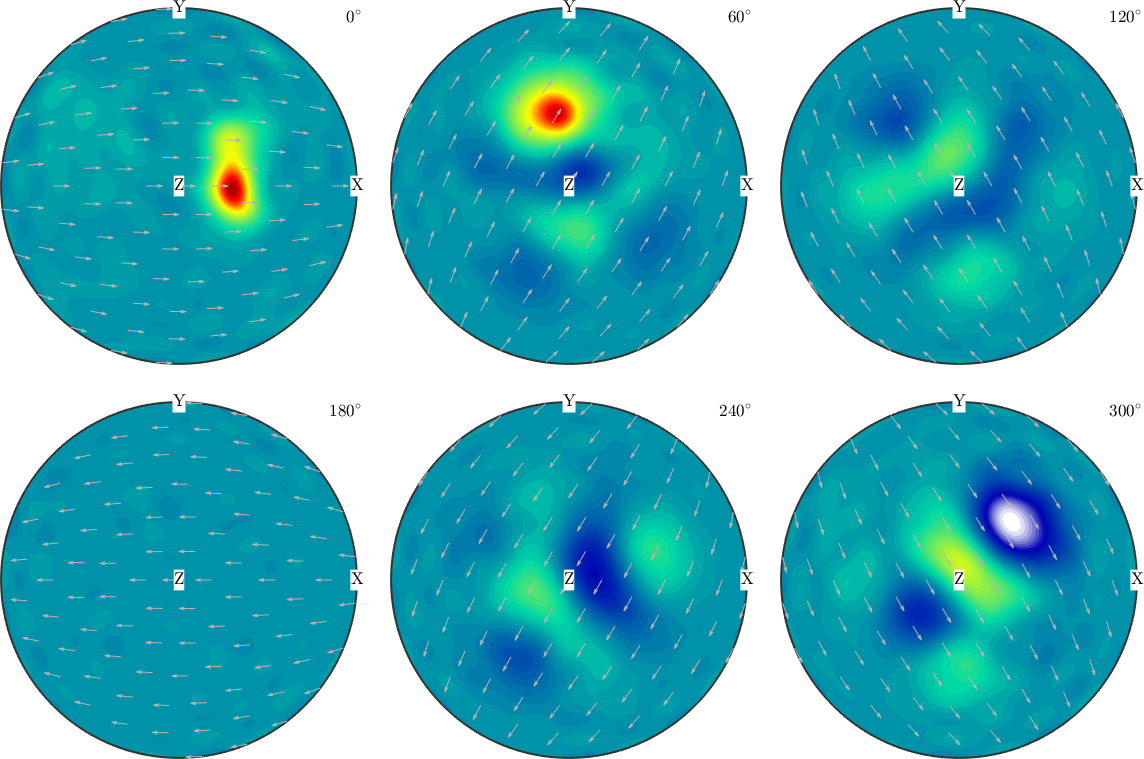
Both fits reach a relative error of 0.0463, and the two plots are hard to tell apart: at \(\lambda=10^{-8}\) the regularization barely constrains this fit. A larger \(\lambda\) trades residual for smoothness. An unregularized fit is free to create narrow peaks and ripples between the samples, and a smaller residual is not by itself evidence for a better model. The next page explains how to choose regularization and check solver convergence.
Reducing the harmonic bandwidth is another form of regularization. The bandwidth is the largest harmonic degree retained by the series.
SO3FLow = interp(ori,S.values,'harmonic', ...
  'regularization',0,'bandwidth',16)
relativeErrorLow = norm(SO3FLow.eval(ori) - S.values) / norm(S.values)

plot(SO3FLow,'sigma')
SO3FLow = SO3FunHarmonic (1 → y↑→x)
bandwidth: 16
weight: 1
relativeErrorLow =
0.1057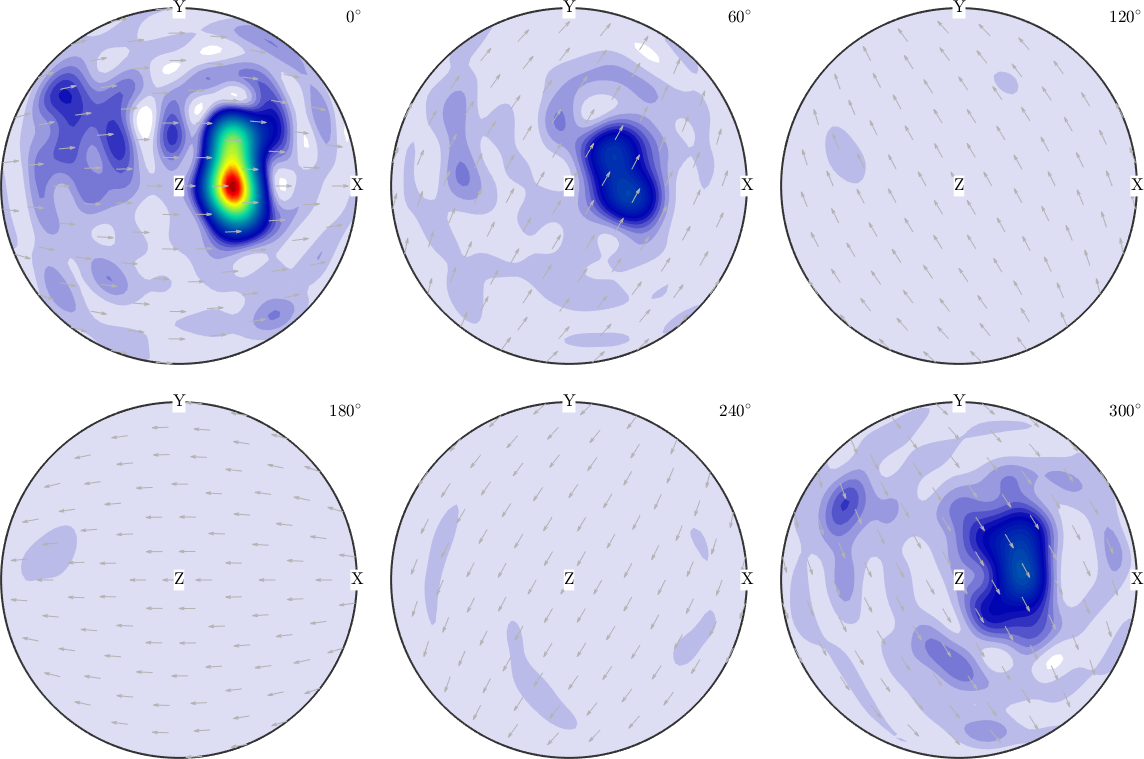
The bandwidth-16 fit cannot reproduce variations finer than its truncated series permits. It is smoother than the unrestricted unregularized fit, but bandwidth alone does not enforce the physical constraints of an ODF. In particular, harmonic approximation cannot guarantee a nonnegative function even when every supplied value is nonnegative.
minimumHarmonicValue = min(SO3FLow)minimumHarmonicValue =
-12.2596Density-constrained RBF approximation
Without a method flag, interp uses an RBF model and internally calls SO3FunRBF.interpolate. The 'density' flag constrains the weights so that the result is nonnegative and then normalizes its mean to 1.
SO3FDensity = interp(ori,S.values,'density');
relativeErrorDensity = ...
  norm(SO3FDensity.eval(ori) - S.values) / norm(S.values)
minimumDensityValue = min(SO3FDensity)
meanDensityValue = mean(SO3FDensity)

plot(SO3FDensity,'sigma')
Warning: Maximum number of iterations reached, result may not have converged to
the optimum yet.
relativeErrorDensity =
0.0125
minimumDensityValue =
3.3899e-05
meanDensityValue =
1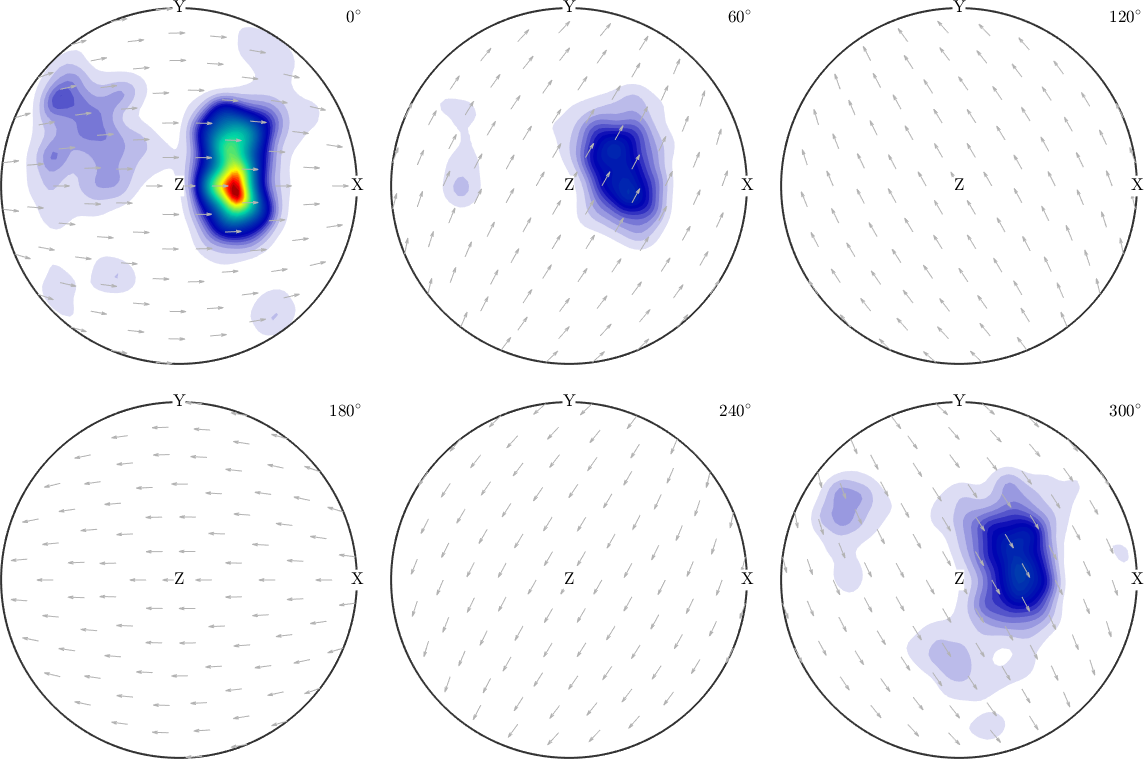
The peaks follow the high-valued sample regions, while the background remains nonnegative. The printed minimum and mean check the two density constraints directly. The residual can be larger than for an unconstrained fit because those constraints remove otherwise admissible solutions. If MTEX reports that the iteration limit was reached, the coefficients may not yet be optimal. Adjust 'maxit' or 'tol' before making a quantitative comparison.
The key smoothing parameter is the kernel halfwidth. A larger halfwidth blends information over a wider angular neighbourhood. A very small halfwidth can overfit the samples.
psi = SO3DeLaValleePoussinKernel('halfwidth',2.5*degree);
SO3FNarrow = interp(ori,S.values,'kernel',psi, ...
  'density','resolution',5*degree);

plot(SO3FNarrow,'sigma')
Warning: Maximum number of iterations reached, result may not have converged to
the optimum yet.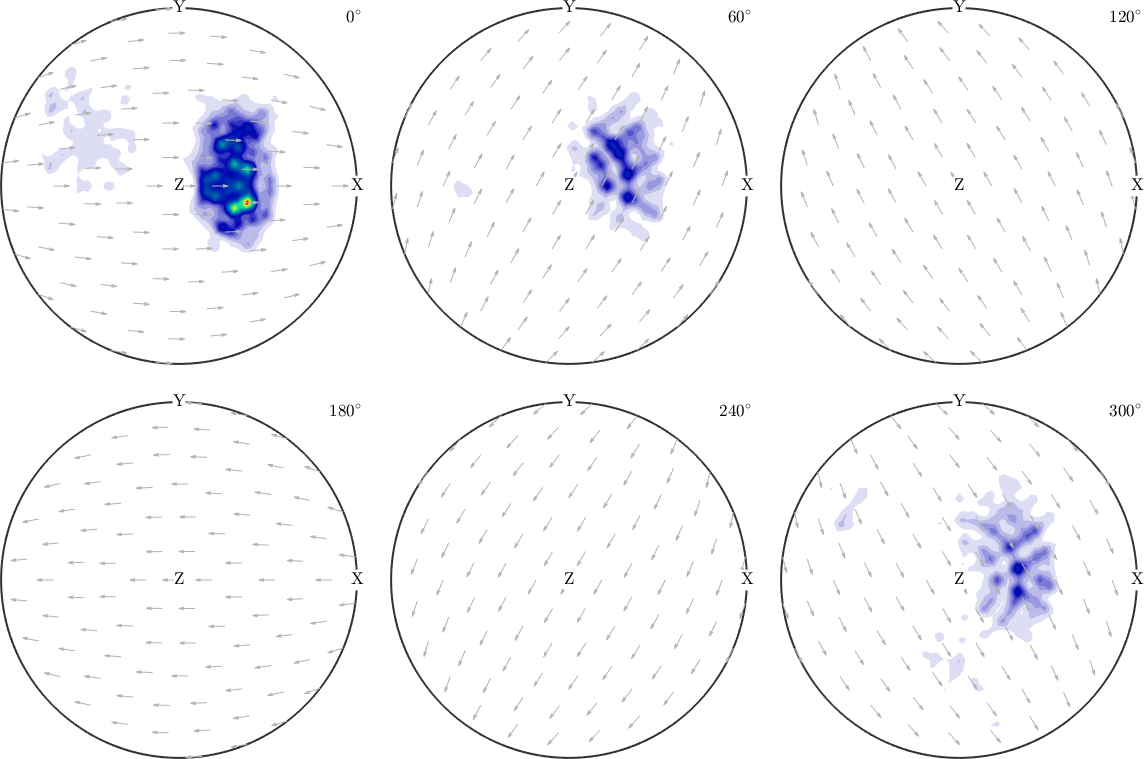
The centre spacing remains 5 degrees, so the change from the default fit comes from the 2.5 degree kernels. They produce narrower local features. Features that merely mirror the sample spacing are a warning that the halfwidth is too small. The RBF theory page develops this diagnostic and the other solver options.
Unconstrained RBF approximation
Omitting 'density' solves an unconstrained least-squares problem. As in the harmonic setting, the result may become negative and its mean need not equal 1.
SO3FRBF = interp(ori,S.values);
relativeErrorRBF = norm(SO3FRBF.eval(ori) - S.values) / norm(S.values)
minimumRBFValue = min(SO3FRBF)
meanRBFValue = mean(SO3FRBF)

plot(SO3FRBF,'sigma')
relativeErrorRBF =
6.1048e-04
minimumRBFValue =
-6.0528
meanRBFValue =
0.9806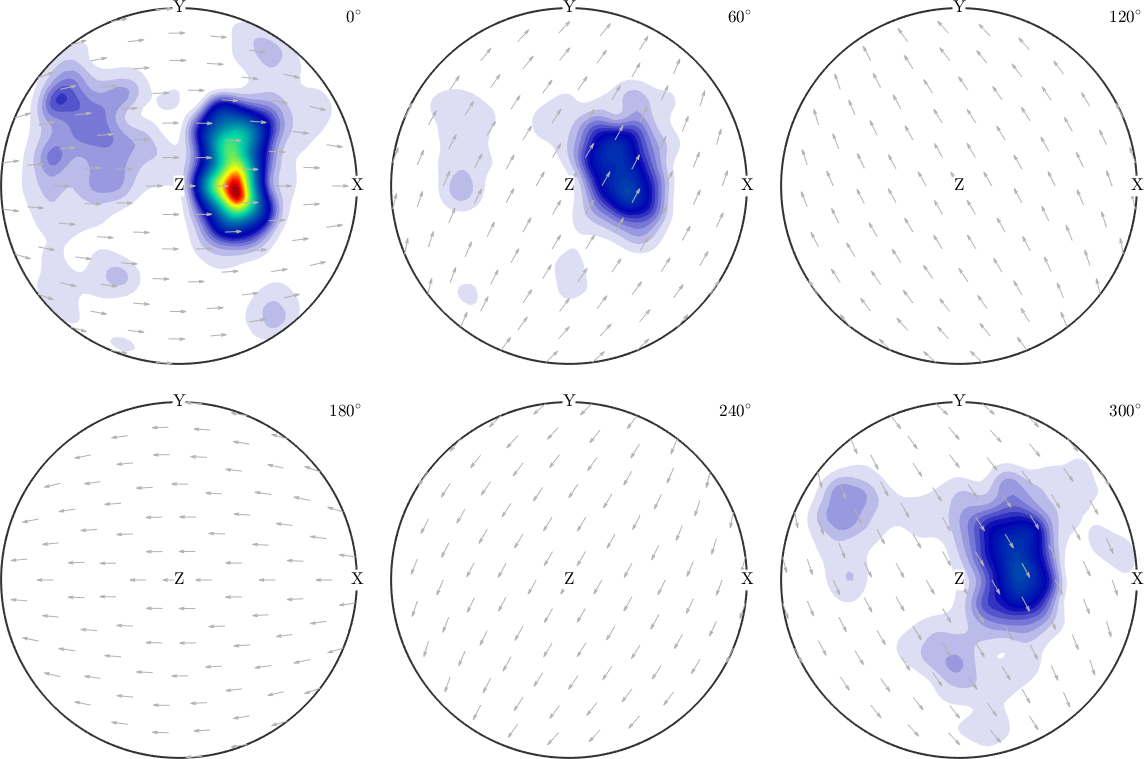
The unconstrained plot may follow the samples more closely, but the printed minimum and mean show why it should not automatically be interpreted as an ODF. Use this form for a general scalar response whose sign and mean are not prescribed. The same iteration-limit warning applies here: validate convergence before comparing residuals.
Fitting a Bingham distribution
SO3FunBingham.interpolate fits the samples with one Bingham distribution. The flag 'bingham' selects it through interp. The following controlled example begins with a fibre ODF and samples it on a coarse grid.
cs = crystalSymmetry("1");
odf = fibreODF(fibre.rand(cs));
S3G = equispacedSO3Grid(cs,'resolution',15*degree);
v = odf.eval(S3G);

plot(odf)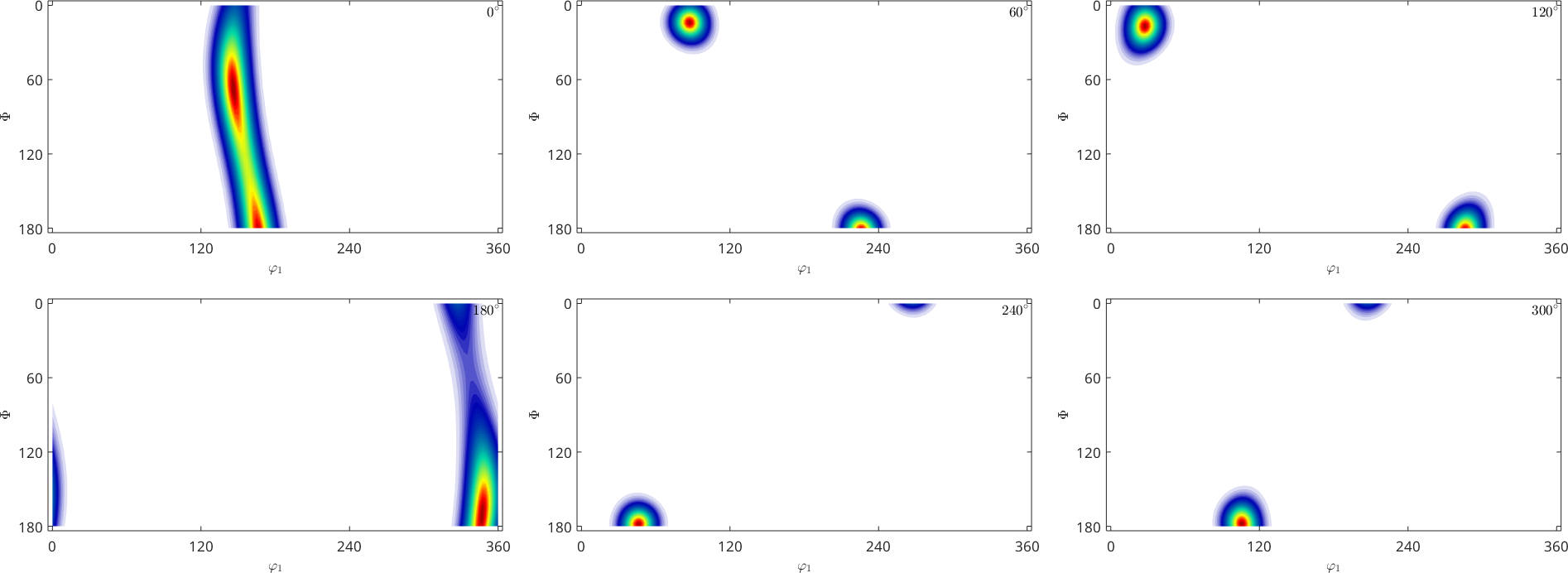
The source ODF has a continuous ridge of high values along one fibre. A Bingham distribution with two large equal concentrations and one zero is exactly that girdle shape, so a single component describes this ODF almost perfectly.
SO3FBingham = interp(S3G,v,'bingham')
relativeErrorBingham = ...
  norm(SO3FBingham.eval(S3G) - v) / norm(v)
% Equivalent direct call:
% SO3FBingham = SO3FunBingham.interpolate(S3G,v);

plot(SO3FBingham)
SO3FBingham = SO3FunBingham (1 → y↑→x)
kappa: 93 93 0 2
weight: 1
relativeErrorBingham =
0.0089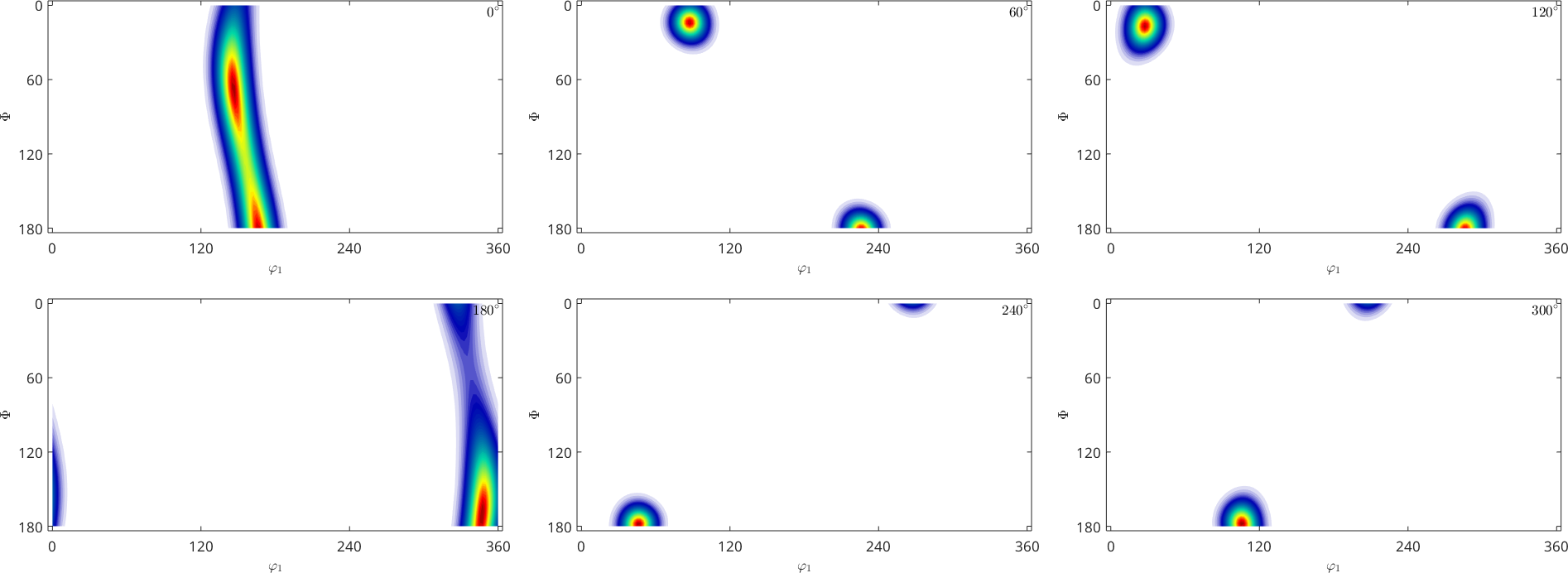
The printed concentrations show the girdle case, the residual is under one percent, and the two plots are hard to tell apart. One Bingham component has few parameters, so a source whose structure a girdle cannot hold - several separated components, say - is where this fit would fall short.
Bingham approximation currently works only for trivial symmetry. With nontrivial crystal symmetry, interp(...,'bingham') does not report an error but silently returns a poor fit. On default 5 degree grids, the relative error against the source ODF was measured as 0.004 for '1', but 0.95 for '2', 0.91 for '222', and 0.67 for '432'. The coarser 15 degree demonstration above prints 0.0072 for '1'. Do not use this route for the nontrivial symmetries.
A response that is not an ODF
Density constraints are wrong for a property that may be negative or need not have mean 1. To make that distinction visible, consider noisy samples of
\[ f(\mathbf{R}) = \cos(\omega(\mathbf{R})) \sin(3\varphi_1(\mathbf{R})) + \frac{1}{2}. \]
Here \(\omega(\mathbf{R})\) is the rotation angle, and \(\varphi_1(\mathbf{R})\) is the first Euler angle of \(\mathbf{R}\).
f = SO3FunHandle(@(r) cos(r.angle).*sin(3*r.phi1) + 0.5);
plot(f,'sigma')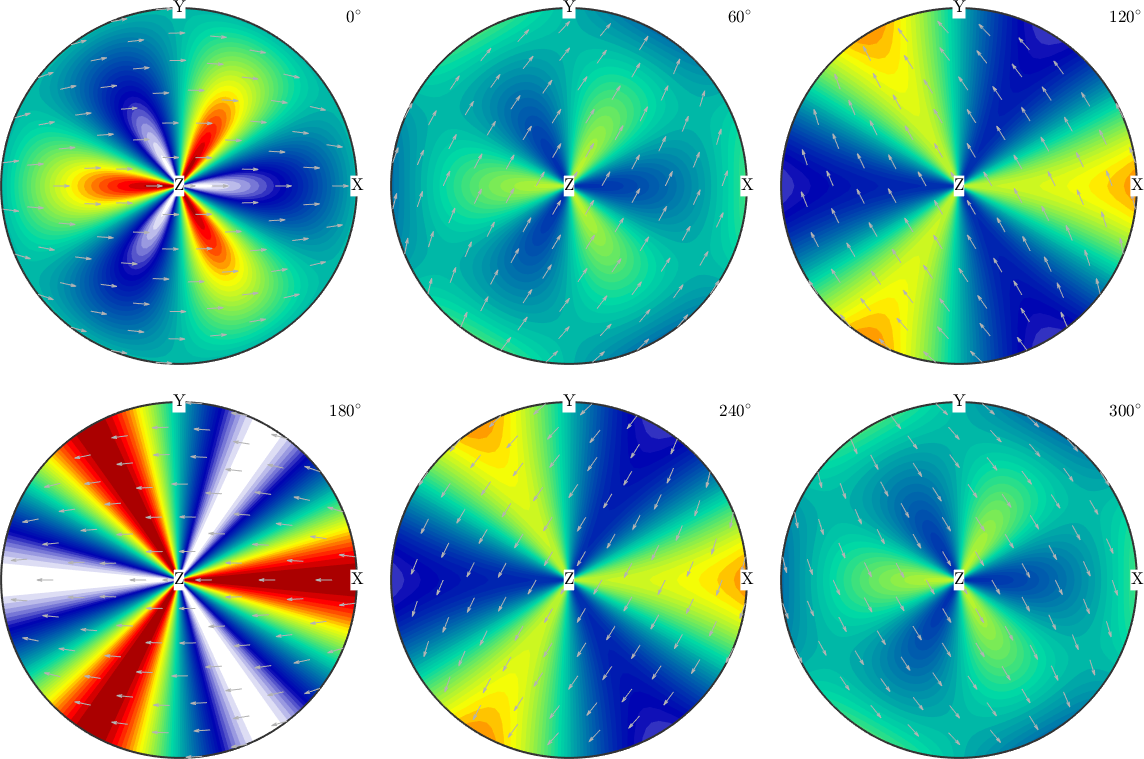
The exact response contains broad positive and negative lobes. A density fit would erase the negative part and change the intended quantity.
ori2 = orientation.rand(1e5);
val2 = f.eval(ori2);
val2 = val2 + randn(size(val2)) * 0.05 * std(val2);
Fit the same 100,000 noisy samples with an unconstrained harmonic model and an unconstrained RBF model. A 12 degree RBF centre grid keeps this teaching example practical while retaining the large set of observations.
FH = interp(ori2,val2,'harmonic')
plot(FH,'sigma')
FH = SO3FunHarmonic (1 → y↑→x)
bandwidth: 40
weight: 0.5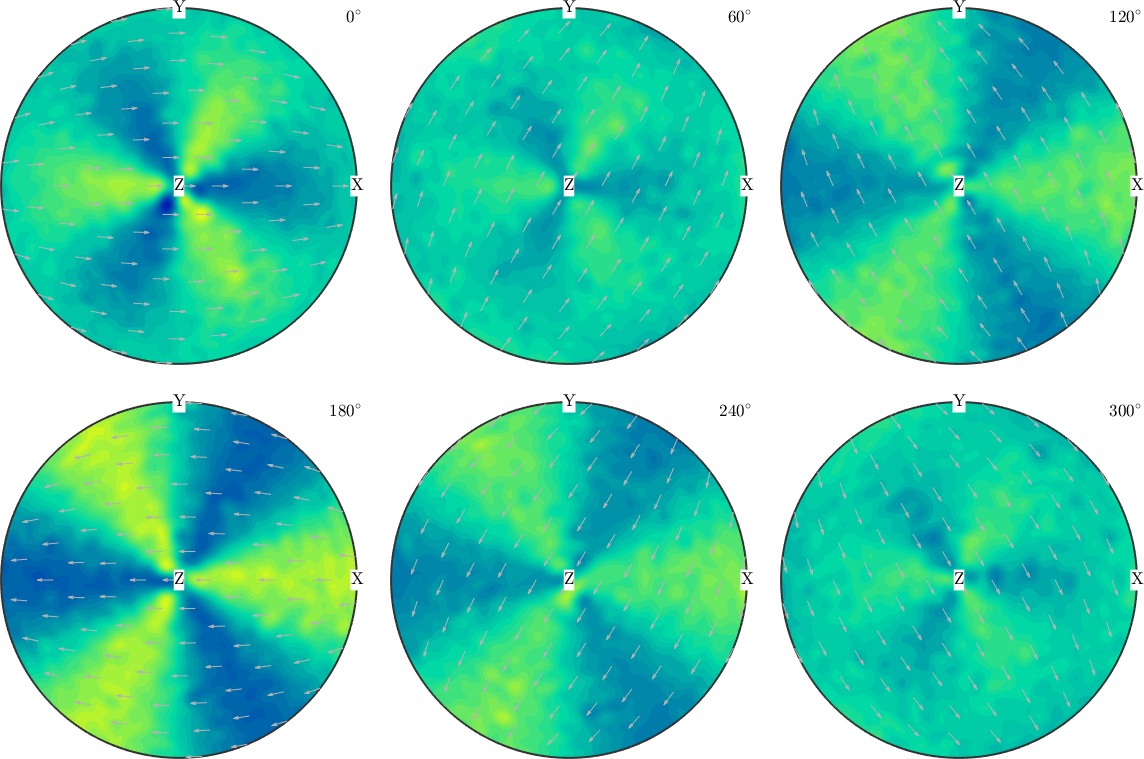
The harmonic fit recovers the broad alternating lobes, and it follows the samples more closely than the noise level warrants. Its values run to about \(-1.5\) and \(2.6\), well outside the exact range of \(-0.5\) to \(1.5\), so the global series is fitting the noise along with the signal.
FK = interp(ori2,val2,'resolution',12*degree)
plot(FK,'sigma')
Warning: Maximum number of iterations reached, result may not have converged to
the optimum yet.
FK = SO3FunRBF (1 → y↑→x)
multimodal components
kernel: de la Vallee Poussin, halfwidth 12°
center: 8520 orientations, resolution: 12°
weight: 0.5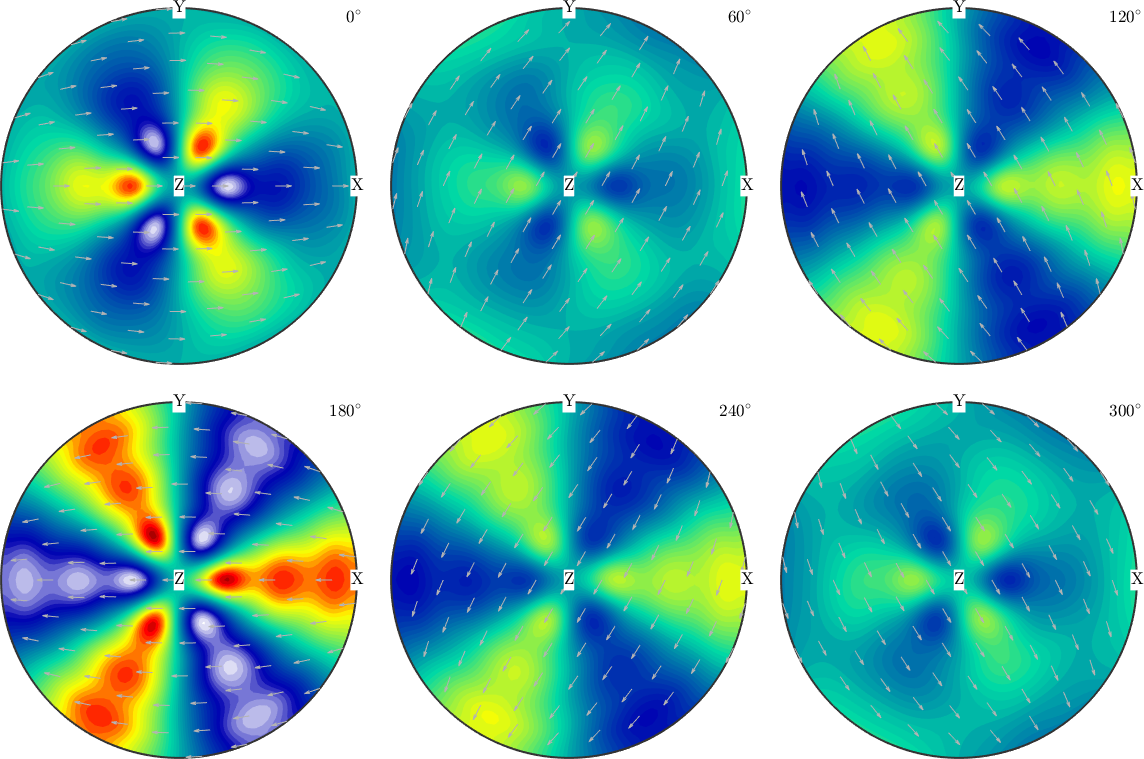
The RBF fit recovers the same sign changes through overlapping local kernels and stays much closer to the exact range. It reproduces the noisy samples less well and the underlying function better. Choose between the two by validation error on held-out samples and by computational cost, not by how closely each reproduces the data it was given.
References
- H. Schaeben, F. Bachmann, and J.-J. Fundenberger, Construction of weighted crystallographic orientations capturing a given orientation density function, Journal of Materials Science 52 (2017), 2077-2090, gives the constrained RBF formulation used for density approximation.
- C. Bingham, An antipodally symmetric distribution on the sphere, Annals of Statistics 2 (1974), 1201-1225, introduces the parametric distribution used by the Bingham fit.
Next
Continue with Harmonic Interpolation to tune bandwidth, regularization, weights, and stopping criteria. Then use RBF-Kernel Interpolation to choose a kernel grid, halfwidth, density constraint, and least-squares solver.
Citing this page.
This page is part of the documentation of
MTEX, a free and open
source MATLAB toolbox for analyzing and modeling crystallographic textures.
It was written by The MTEX Developers and is published at
https://mtex-toolbox.github.io/SO3FunApproximationTheory.html.
If you use MTEX, or reuse text or figures from this page, in your research,
please cite
F. Bachmann, R. Hielscher, H. Schaeben: Texture Analysis with MTEX - Free and Open Source Software Toolbox, Solid State Phenomena 160 (2010), 63-68. 10.4028/www.scientific.net/SSP.160.63
BibTeX
@article{bachmann2010mtex,
  author  = {F. Bachmann and R. Hielscher and H. Schaeben},
  title   = {Texture Analysis with MTEX - Free and Open Source Software Toolbox},
  journal = {Solid State Phenomena},
  volume  = {160},
  pages   = {63-68},
  year    = {2010},
  doi     = {10.4028/www.scientific.net/SSP.160.63},
  url     = {https://doi.org/10.4028/www.scientific.net/SSP.160.63}
}
Other papers describing specific MTEX methods are listed under Publications — please cite the one that best fits your application. The MTEX source code is licensed under the GNU General Public License v2.0; the text and figures of this documentation are licensed under CC BY 4.0, which permits reuse — including by automated systems — provided The MTEX Developers and this page are credited.