
Curvature measures how sharply a boundary trace bends. A straight stretch has zero curvature, while a tightly rounded stretch has a large magnitude. The sign records the direction of the bend and therefore needs an oriented walk along the boundary.
MTEX stores a grain boundary as short segments between neighbouring EBSD measurements that belong to different grains. A chain is a maximal run of these segments laid end to end, from one junction to the next.
This page assumes that grains have already been reconstructed as in Grain Reconstruction. Grain Boundary Properties introduces segments, chains, and the two grain IDs stored beside each segment.
The curvature is the reciprocal of a local circle radius. Its unit is therefore the inverse of the EBSD coordinate unit, usually 1/µm. A circle of radius 2 has constant curvature magnitude 1/2. The closing maths section gives the precise three-point definition.
close all;

% import artificial grain shapes
mtexdata testgrains silent

% select and smooth a range of convex, concave, and enclosing grains
grains = smoothBoundary(grains('id',[2 3 9 11 15 16 18 23 31 33 38 40]),10);
Colour a Boundary by Curvature
Extract the boundary segments and plot them first as a dark background.
gB = grains.boundary;
plot(gB,'lineWidth',10,'micronbar','off');

% overlay the same segments coloured by signed curvature
hold on
plot(gB,gB.curvature,'lineWidth',6);
hold off

mtexColorMap('blue2red')
setColorRange(0.25*[-1,1])
mtexColorbar('title',['signed curvature in 1/' gB.scanUnit])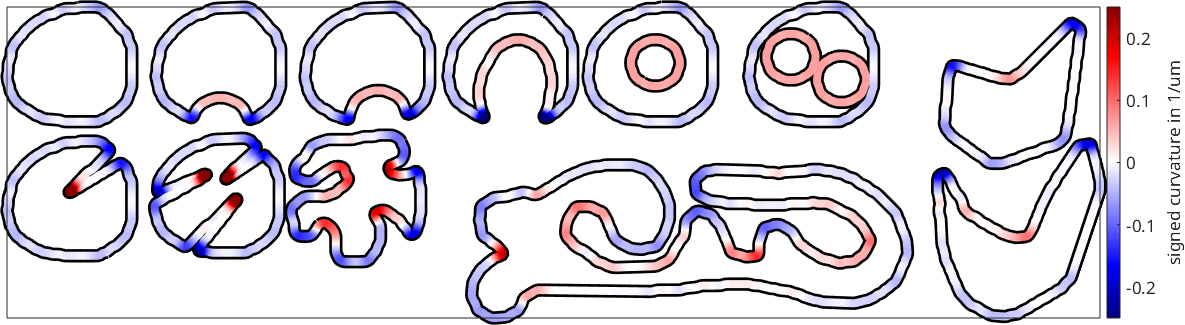
Blue and red mark opposite bending directions. The nearly straight sides fade towards white, while sharp notches reach the ends of the colour scale. The fixed range clips magnitudes above 0.25, so saturated colour means at least that magnitude rather than exactly 0.25.
The Sign of the Curvature
Boundary segments are stored in walk order. The grain in the first column of gB.grainId lies to the left of the walk direction; see Boundary Misorientations.
Positive curvature means that the boundary bulges into the grain in the second column. Negative curvature means that it bulges into the grain in the first column. The first five segments of grain 2 show the column order.
grainIdPairs = grains('id',2).boundary.grainId(1:5,:)grainIdPairs =
44 2
44 2
44 2
44 2
44 2Every row is [44 2]. All selected shapes sit inside the large surrounding grain 44, which occupies the first column along each outer boundary. Grain 2 is convex, so its outer boundary bulges into grain 44, the grain in the first column. Its curvature is therefore negative throughout.
This storage convention explains why most convex parts in the first figure are blue, while notches and enclosed grains are red. The enclosed grains are stored the other way around, with the enclosed grain in the first column. Their convex boundaries bulge into the ring-shaped grains 23 and 31.
The column order is not an intrinsic property of an unoriented boundary. It follows from the direction in which each chain is walked. The flip command reverses the walk, swaps the two columns, and changes the sign of the curvature.
gB2 = grains('id',2).boundary;
gB2Flipped = flip(gB2);

turnsBeforeAfterFlip = [sum(gB2.curvature .* gB2.segLength), ...
  sum(gB2Flipped.curvature .* gB2Flipped.segLength)] ./ (2*pi)
turnsBeforeAfterFlip =
-1.0199 1.0199The normalized sums are about -1.02 and 1.02. Reversing the walk changes only the sign. A smooth simple closed curve has a total turning of \(\pm 2\pi\); the small offset here comes from the discrete approximation.
Curvature With Respect to a Specific Grain
Selecting one grain does not change the storage order of its boundary. The requested grain may still occupy either column of grainId.
To read convexity relative to one grain, put that grain in the first column for every segment. Flip exactly the segments on which it is currently in the second column. That grain then lies to the left of the walk everywhere. Positive curvature then marks a convex part of that grain, while negative curvature marks a notch.
for k = 1:length(grains)

  gB = grains(k).boundary;

  % put the selected grain into the first column
  gB = flip(gB,gB.grainId(:,2) == grains(k).id);

  plot(gB,'lineWidth',10,'micronbar','off');
  hold on
  plot(gB,gB.curvature,'lineWidth',6);

end
hold off

mtexColorMap('blue2red')
setColorRange(0.25*[-1,1])
mtexColorbar('title',['grain-relative curvature in 1/' gB.scanUnit])
drawNow(gcm,'figSize',getMTEXpref('figSize'))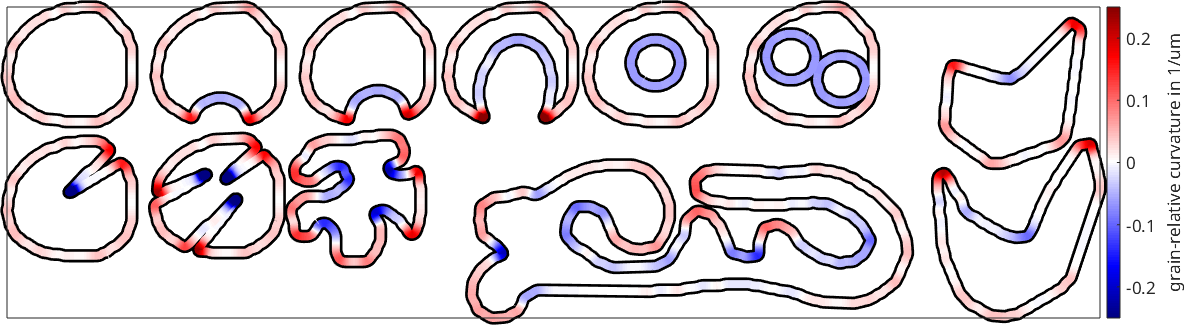
The outer boundaries are now predominantly red because they are convex relative to their own grains. The enclosed boundaries have turned blue. Seen from ring-shaped grains 23 and 31, those boundaries are concave.
Undefined Segments and the Two Smoothing Steps
MTEX computes a segment's curvature from its midpoint and the midpoints of its two neighbours in the same chain. An end segment of an open chain has a neighbour on only one side, so its curvature is NaN. Closed chains wrap around and have curvature at every segment.
All complete chains above are closed. An arbitrary subset of segments is generally open, however. The first 100 segments have two undefined ends.
gB = grains.boundary;
numberUndefined = sum(isnan(gB(1:100).curvature))
numberUndefined =
2Two different operations are called smoothing here. The earlier smoothBoundary call changed the boundary geometry to suppress its pixel staircase. That step matters because local curvature amplifies small geometric irregularities.
The argument to gB.curvature(n) instead smooths the computed scalar values along each chain without moving the boundary. It defaults to 50 passes. Zero requests the unsmoothed three-point values.
gB = grains('id',15).boundary;

% a new figure, so the line plot does not inherit the wide map layout
figure
plot(gB.arcLength,gB.curvature(0),'lineWidth',1)
hold on
plot(gB.arcLength,gB.curvature,'lineWidth',2)
hold off

legend('no scalar smoothing','50 scalar-smoothing passes')
xlabel(['arc length in ' gB.scanUnit])
ylabel(['curvature in 1/' gB.scanUnit])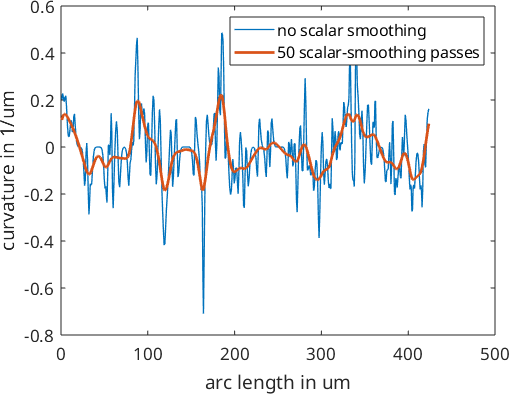
The thin curve follows individual midpoint triples and contains sharp spikes. Fifty passes retain the broad changes of sign while suppressing segment-scale fluctuations. Smoothing therefore changes the local peaks; compare data sets only after choosing the same geometry and scalar filters. Grain Boundary Smoothing develops the first choice.
Curvature of a Real EBSD Map
The same procedure applies to a reconstructed EBSD map. First reconstruct and smooth the grains, then orient the chosen boundary relative to its grain. An inverse pole figure map supplies the orientation-coloured background.
mtexdata titanium silent
[grains,ebsd] = calcGrains(ebsd);
grains = smoothBoundary(grains,5);

% compute the IPF colours explicitly to keep the published output quiet
indexed = ebsd('indexed');
colorKey = ipfColorKey(indexed);
ipfColors = colorKey.orientation2color(indexed.orientations);
plot(indexed,ipfColors)

hold on
plot(grains.boundary,'lineWidth',4)

% select the grain containing this position and put it in the first column
grain = grains(596,466);
gB = flip(grain.boundary,grain.boundary.grainId(:,2) == grain.id);

% use five scalar-smoothing passes for the highlighted boundary
plot(gB,gB.curvature(5),'lineWidth',6)
hold off

mtexColorMap('blue2red')
setColorRange(0.05*[-1,1])
mtexColorbar('title',['grain-relative curvature in 1/' gB.scanUnit])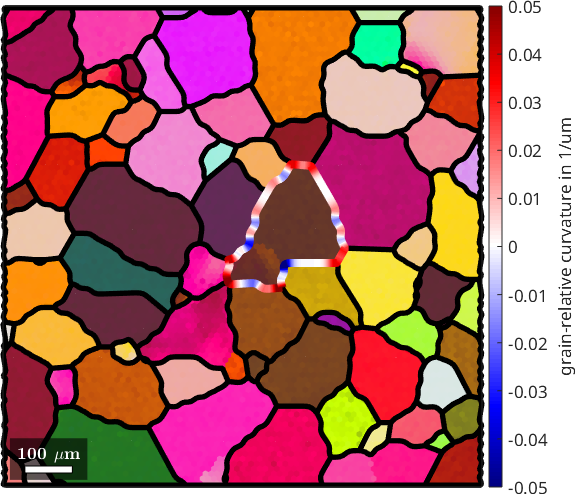
The thick coloured outline marks the grain near the centre of the map. Its broad convex stretches are red, while local inward notches are blue. The black lines show the complete boundary network, and the IPF colours are only a background for locating the selected grain.
What This Curvature Does Not Measure
This is the curvature of a boundary trace in a two-dimensional section. It is not the mean curvature of the boundary surface in three dimensions. A single section does not reveal the surface away from that plane.
The result also inherits the spatial resolution and segmentation of the EBSD map. Boundary smoothing suppresses the grid staircase but moves and resamples the trace, so the smoothing choice is part of the measurement rather than a cosmetic plotting choice.
The Maths Behind the Three-Point Curvature
For consecutive segment midpoints \(\mathbf{p}_{-}\), \(\mathbf{p}_0\), and \(\mathbf{p}_{+}\), MTEX uses signed Menger curvature
\[\kappa = \frac{4 A_s}{a b c} = \frac{1}{R}.\]
Here \(a\), \(b\), and \(c\) are the triangle's side lengths. \(A_s\) is its signed area, and \(R\) is the radius of its circumcircle. Collinear points give zero. Reversing the walk changes the sign of \(A_s\) and leaves the radius unchanged.
For a smooth simple closed curve, integrating signed curvature over arc length gives its total turning,
\[\oint_C \kappa\,\mathrm{d}s = \pm 2\pi.\]
The sign is set by the walk direction, as the numerical check above showed.
Further Reading
- K. Menger, Zur allgemeinen Kurventheorie, Fundamenta Mathematicae 10, 96-115, 1927, introduces the three-point curvature used here.
- W.W. Mullins, Two-Dimensional Motion of Idealized Grain Boundaries, Journal of Applied Physics 27, 900-904, 1956, relates curvature to idealized grain-boundary motion.
- D.T. Fullwood et al., Determining Grain Boundary Position and Geometry from EBSD Data: Limits of Accuracy, Microscopy and Microanalysis 28, 96-108, 2022, discusses the experimental limits on boundary position.
- X. Zhong et al., The Five-Parameter Grain Boundary Curvature Distribution in an Austenitic and Ferritic Steel, Acta Materialia 123, 136-145, 2017, treats curvature of three-dimensional grain-boundary surfaces.
- G. Gottstein and L.S. Shvindlerman, Grain Boundary Migration in Metals, second edition, CRC Press, 2010, develops the thermodynamics and kinetics of curvature-driven migration.
Next
Continue with Grain Boundary Smoothing to choose how the reconstructed pixel staircase is simplified, resampled, and smoothed.
Citing this page.
This page is part of the documentation of
MTEX, a free and open
source MATLAB toolbox for analyzing and modeling crystallographic textures.
It was written by The MTEX Developers and is published at
https://mtex-toolbox.github.io/BoundaryCurvature.html.
If you use MTEX, or reuse text or figures from this page, in your research,
please cite
F. Bachmann, R. Hielscher, H. Schaeben: Texture Analysis with MTEX - Free and Open Source Software Toolbox, Solid State Phenomena 160 (2010), 63-68. 10.4028/www.scientific.net/SSP.160.63
BibTeX
@article{bachmann2010mtex,
  author  = {F. Bachmann and R. Hielscher and H. Schaeben},
  title   = {Texture Analysis with MTEX - Free and Open Source Software Toolbox},
  journal = {Solid State Phenomena},
  volume  = {160},
  pages   = {63-68},
  year    = {2010},
  doi     = {10.4028/www.scientific.net/SSP.160.63},
  url     = {https://doi.org/10.4028/www.scientific.net/SSP.160.63}
}
Other papers describing specific MTEX methods are listed under Publications — please cite the one that best fits your application. The MTEX source code is licensed under the GNU General Public License v2.0; the text and figures of this documentation are licensed under CC BY 4.0, which permits reuse — including by automated systems — provided The MTEX Developers and this page are credited.