
An MTEX command first receives the arguments it needs to do its job. Optional name-value pairs then adjust how that job is done. A flag is an option whose presence alone switches a behaviour on.
In the following pattern, data is a required argument, 'resolution' is an option name, and 5*degree is its value. The final 'contour' is a flag.
command(data,'resolution',5*degree,'contour')Options are always optional, may be given in any order, and follow the required arguments. This lets you begin with a default call and add only the controls that matter for the result you need.
A plotting option in practice
MTEX plotting commands understand the 'resolution' option. It specifies how finely a continuous function is evaluated before it is drawn. A large angular step makes a coarse evaluation grid; a small step makes a fine grid and takes more time.
Compare pole figures of the same orientation density function (ODF), first on a 10 degree grid and then on a 2.5 degree grid. An ODF describes how frequently orientations occur in a material.
odf = SantaFe;
h = Miller(1,0,0,odf.CS);

newMtexFigure('layout',[1,2]);
plotPDF(odf,h,'resolution',10*degree,'contour','linewidth',2);
nextAxis
plotPDF(odf,h,'resolution',2.5*degree,'contour','linewidth',2);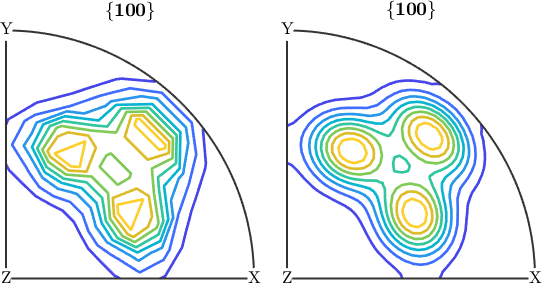
Both plots show the same three maxima. On the left, the 10 degree contour lines are visibly polygonal because the evaluation grid appears as kinks. On the right, the 2.5 degree contour lines are smooth curves. The resolution determines whether the drawing is limited by the function or by the grid on which MTEX evaluated it.
The default resolution is a compromise between detail and run time. Use a finer resolution when a figure will be published or when the grid is visible in a curve that should be smooth.
Flags
A flag takes no value. The 'contour' flag above asks for contour lines instead of a smooth colour plot. Flags and name-value options may be mixed freely and given in any order.
If the same option is given twice, the later value wins. This rule lets a wrapper pass on its varargin input and still override one of its own defaults.
Two traps
A misspelt option is silently ignored. There is no central list of valid names to check because each command reads the options it knows and passes the rest on. Consequently, calcGrains(ebsd,'theshold',10*degree) runs and quietly uses the default threshold. This exact typo survived for years in a published tutorial because the default happened to be the intended value. Copy option names rather than typing them.
Options are matched case insensitively but not by meaning. Thus 'colorRange' and 'colorrange' name the same option, whereas 'colourRange' is not an option at all.
Finding the accepted names
Each MTEX command lists the options and flags it understands in its own help. For example, the help for calcGrains has separate Options and Flags sections:
doc calcGrainsStart with the command's default call, inspect its help, and then append the documented names. This workflow avoids silent spelling errors and makes each non-default choice visible in the script.
References
This page documents MTEX's calling convention and does not rely on an external method or definition.
Next
Properties explains the named values stored inside MTEX objects and how those values differ from the options passed to a command.
Citing this page.
This page is part of the documentation of
MTEX, a free and open
source MATLAB toolbox for analyzing and modeling crystallographic textures.
It was written by The MTEX Developers and is published at
https://mtex-toolbox.github.io/GeneralConceptsOptions.html.
If you use MTEX, or reuse text or figures from this page, in your research,
please cite
F. Bachmann, R. Hielscher, H. Schaeben: Texture Analysis with MTEX - Free and Open Source Software Toolbox, Solid State Phenomena 160 (2010), 63-68. 10.4028/www.scientific.net/SSP.160.63
BibTeX
@article{bachmann2010mtex,
  author  = {F. Bachmann and R. Hielscher and H. Schaeben},
  title   = {Texture Analysis with MTEX - Free and Open Source Software Toolbox},
  journal = {Solid State Phenomena},
  volume  = {160},
  pages   = {63-68},
  year    = {2010},
  doi     = {10.4028/www.scientific.net/SSP.160.63},
  url     = {https://doi.org/10.4028/www.scientific.net/SSP.160.63}
}
Other papers describing specific MTEX methods are listed under Publications — please cite the one that best fits your application. The MTEX source code is licensed under the GNU General Public License v2.0; the text and figures of this documentation are licensed under CC BY 4.0, which permits reuse — including by automated systems — provided The MTEX Developers and this page are credited.