
A fibre is a one-dimensional path through rotation space. A fibre segment joins two orientations along their shortest angular path. A full fibre contains every orientation that maps one fixed crystal direction onto one fixed specimen direction while leaving the rotation about it free.
This page assumes the rotation operations introduced in Calculating with Rotations and the interpretation of an orientation as a map between reference frames from Defining Crystal Orientations. Crystal symmetry and equivalent orientation descriptions are introduced in Orientation Symmetry.
The plotting convention controls how the specimen frame is laid out on screen. This page uses y north and x east.
plottingConvention.default('y↑→x');

% use two reproducible cubic texture components
cs = crystalSymmetry('432');
oriA = orientation.goss(cs);
oriB = orientation.brass(cs);

% select the equivalent of oriB nearest to oriA
oriB = oriB.project2FundamentalRegion(oriA);

% construct the shortest segment between the two representatives
f = fibre(oriA,oriB)
f = fibre (432 → y↑→x)
h || r: (011) || (0,0,1)
o1 → o2: (0°,45°,0°) → (35°,45°,0°)Reading the Fibre
The displayed endpoint row identifies the finite segment. The row containing h and r gives the crystal and specimen directions that remain aligned along it. The two directions live in different reference frames.
The projection above changes only the symmetry-equivalent representative of oriB. It does not change the physical crystal orientation. Choosing the nearest representative makes this endpoint segment the shortest one.
Plotting the Endpoint Segment
The default three-dimensional plot uses Bunge Euler coordinates.
plot(f,'lineWidth',3,'lineColor','red')
hold on
plot(oriA,'filled','MarkerSize',20,'MarkerFaceColor','darkred')
plot(oriB,'filled','MarkerSize',20,'MarkerFaceColor','blue')
hold off
xlim([0 90])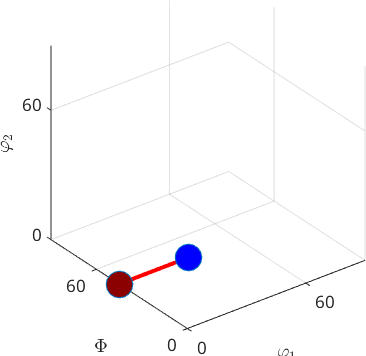
Reading the Endpoint Plot
The red segment joins the dark-red Goss endpoint at \((0,45,0)\) degrees to the blue Brass endpoint at \((35,45,0)\) degrees. Only the first Euler angle changes in this example, so the segment looks straight. In general, angular distance is not Euclidean distance in an Euler coordinate plot.
The Two Directions That Define a Fibre
An orientation maps a direction from the crystal frame into the specimen frame. Every orientation ori on the full fibre satisfies
\[ \mathtt{ori} * h = r. \]
The endpoint constructor has already computed these directions. They are available as the h and r properties of <fibre.fibre.html fibre>.
h = f.hh = Miller (432)
h k l
0 0.7071 0.7071r = f.rr = vector3d (y↑→x)
x y z
0 0 1Both endpoints map h exactly onto r. The two displayed entries are their mapping errors in degrees.
mappingErrorDegrees = ...
  [angle(oriA * h,r),angle(oriB * h,r)] ./ degree
mappingErrorDegrees =
0 0A Full Fibre
The option 'full' discards the finite endpoint and continues the curve through every rotation about the aligned direction.
fullFibre = fibre(oriA,oriB,'full')fullFibre = fibre (432 → y↑→x)
h || r: (011) || (0,0,1)A crystal--specimen direction pair constructs the same full fibre directly. The displayed logical value confirms that the two definitions agree.
directionFibre = fibre(h,r);
sameFullFibre = fullFibre == directionFibre
sameFullFibre =
logical
1Symmetry Can Split the Plot
By default, an orientation plot is folded into a fundamental region.
figure;
plot(fullFibre,'axisAngle','lineWidth',3,'lineColor','red')
axis off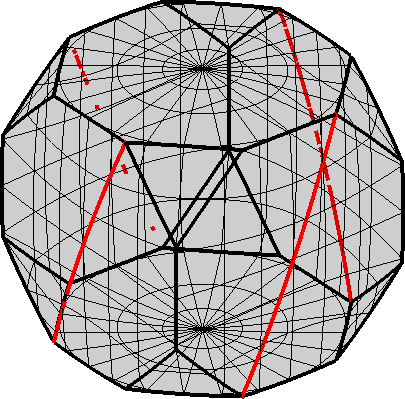
Reading the Symmetry-Reduced Plot
The red fibre appears as disconnected arcs because it leaves the chosen fundamental region and re-enters through a symmetry-equivalent face. These arcs belong to one fibre, not to several different fibres.
The Complete Axis--Angle Domain
The option 'complete' removes the reduction by crystal symmetry.
figure;
plot(fullFibre,'axisAngle','lineWidth',3,'lineColor','red','complete')
axis off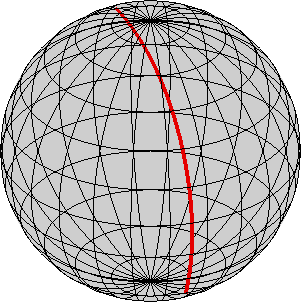
Reading the Complete Plot
The complete axis--angle ball exposes more of the red curve without the cubic fundamental-region faces. It still has a coordinate seam: opposite points on the outer sphere describe the same half turn. A curve cut at that seam is therefore still one closed fibre in rotation space.
Sampling a Fibre
orientation discretises a fibre for plotting or numerical calculations. Specify the number of samples when it matters.
sampledOri = orientation(f,'points',12);
numberOfSamples = length(sampledOri)
numberOfSamples =
12The markers show the 12 sampled orientations on the finite endpoint segment. The continuous red curve remains the underlying fibre.
plot(f,'lineWidth',2,'lineColor','red')
xlim([0 90])
hold on
plot(sampledOri,'MarkerSize',8,'MarkerEdgeColor','darkblue','linewidth',2)
hold off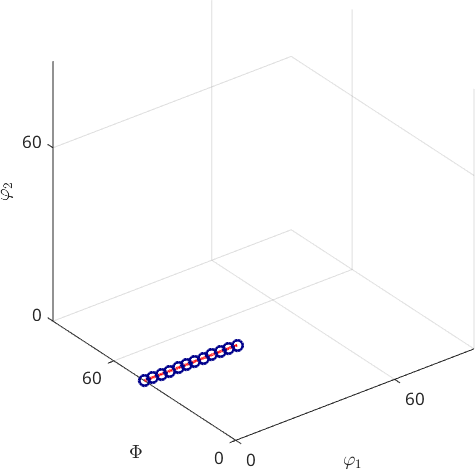
Why a Full Fibre Is a Circle
Unit quaternions represent rotations with the identification \(q=-q\). Starting from a quaternion \(q_0\), a spin through the angle \(\omega\) about the aligned direction traces
\[ q(\omega)=\left(\cos\frac{\omega}{2}, \sin\frac{\omega}{2}\,\mathbf{n}\right)q_0. \]
As \(\omega\) runs from 0 to \(2\pi\), this path follows half of a great circle on the unit 3-sphere from \(q_0\) to \(-q_0\). Those endpoints represent the same rotation, so their projection into rotation space is a closed circle. The finite fibre constructed first is one subarc of this circle.
Where Fibres Reappear in MTEX
angle measures the distance from an orientation to a fibre. Fibres of Orientations develops pole-figure and inverse-pole-figure plots, symmetrisation, and named rolling-texture fibres. Fibre ODFs spreads a density around a fibre.
Pole-figure values integrate an ODF over fibres. This integration is the crystallographic Radon transform developed in the pole figure tutorial.
Further Reading
- A. Morawiec, Orientations and Rotations: Computations in Crystallographic Textures, Springer, 2004, develops the geometry of rotation space and its symmetry-reduced regions.
- H.-J. Bunge, Texture Analysis in Materials Science: Mathematical Methods, Butterworths, 1982, develops fibre textures and orientation distributions.
- D. Chateigner, L. Lutterotti and M. Morales, Quantitative texture analysis and combined analysis, International Tables for Crystallography, Volume H, 2019, places fibre textures and the Radon transform in diffraction texture analysis.
Next
Continue with Fibres of Orientations for crystallographic plotting and named texture fibres, then Fibre ODFs for density models around them.
Citing this page.
This page is part of the documentation of
MTEX, a free and open
source MATLAB toolbox for analyzing and modeling crystallographic textures.
It was written by The MTEX Developers and is published at
https://mtex-toolbox.github.io/RotationFibre.html.
If you use MTEX, or reuse text or figures from this page, in your research,
please cite
F. Bachmann, R. Hielscher, H. Schaeben: Texture Analysis with MTEX - Free and Open Source Software Toolbox, Solid State Phenomena 160 (2010), 63-68. 10.4028/www.scientific.net/SSP.160.63
BibTeX
@article{bachmann2010mtex,
  author  = {F. Bachmann and R. Hielscher and H. Schaeben},
  title   = {Texture Analysis with MTEX - Free and Open Source Software Toolbox},
  journal = {Solid State Phenomena},
  volume  = {160},
  pages   = {63-68},
  year    = {2010},
  doi     = {10.4028/www.scientific.net/SSP.160.63},
  url     = {https://doi.org/10.4028/www.scientific.net/SSP.160.63}
}
Other papers describing specific MTEX methods are listed under Publications — please cite the one that best fits your application. The MTEX source code is licensed under the GNU General Public License v2.0; the text and figures of this documentation are licensed under CC BY 4.0, which permits reuse — including by automated systems — provided The MTEX Developers and this page are credited.