
plottingConvention.default('y↑→x');Crystal symmetry describes operations that leave a crystal lattice unchanged. Specimen symmetry describes operations that leave the texture of a specimen unchanged. The forming process is often the physical reason for this invariance.
Rolling, for example, is commonly modelled by orthorhombic specimen symmetry. A texture with this symmetry is unchanged by \(180^\circ\) rotations about the rolling direction (RD), transverse direction (TD), and normal direction (ND).
This is a model of the texture, not a consequence of the specimen having a rectangular shape. A shear texture, a through-thickness gradient, or a misaligned specimen may not have that symmetry. Imposing symmetry that is absent averages distinct components together and hides real information.
An orientation maps coordinates from the crystal frame into the specimen frame. Specimen symmetry therefore acts from the left, while crystal symmetry acts from the right. See Symmetrically Equivalent Orientations.
Defining a Specimen Symmetry
An specimenSymmetry is defined by its point group. Only a small number of point groups occur in practice. The trivial group is the default when no specimen symmetry is specified.
ss = specimenSymmetry('1')ss = triclinic specimenSymmetry (y↑→x)Orthorhombic specimen symmetry is the common choice for rolled material. It may be specified by its point group 'mmm' or by the name 'orthorhombic'.
ss = specimenSymmetry('mmm')ss = orthorhombic specimenSymmetry (y↑→x)The full point group mmm has eight operations. Its proper subgroup has four rotations: the identity and one \(180^\circ\) rotation about each specimen axis. Orientations live in the rotation group, so these proper operations are the ones that identify equivalent orientations.
numberOfOperations = numSym(ss)
numberOfProperRotations = numProper(ss)
numberOfOperations =
8
numberOfProperRotations =
4Note the difference between '1' and 'triclinic'. The first denotes the identity alone. The lattice-type name 'triclinic' selects the point group \(\bar 1\), which also contains inversion.
numberInIdentityGroup = numSym(specimenSymmetry('1'))
numberInTriclinicGroup = numSym(specimenSymmetry('triclinic'))
numberInIdentityGroup =
1
numberInTriclinicGroup =
2The Effect on an ODF
An orientation distribution function (ODF) is a density over orientations. We begin with one smooth component and trivial specimen symmetry.
cs = crystalSymmetry.load('quartz.cif');
odf = unimodalODF(orientation.byEuler(30*degree,50*degree,10*degree,cs), ...
  'halfwidth',15*degree);
The 'complete','upper' flags keep the full upper hemisphere visible. This matters for the comparison below, because a plot with nontrivial specimen symmetry otherwise defaults to its specimen fundamental sector.
plotPDF(odf,Miller(1,0,-1,0,cs),'contourf','complete','upper')
mtexColorbar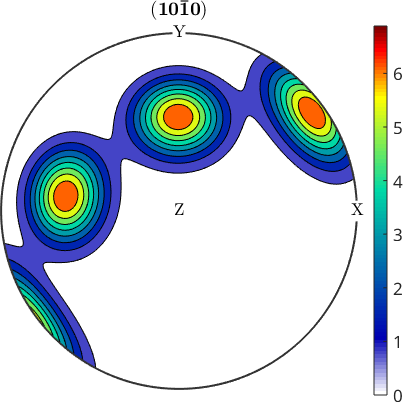
The peaks are equivalent crystal poles. Notice that their pattern is not forced to be symmetric about both horizontal and vertical specimen axes.
The texture index is the squared norm of the ODF. The first value is the baseline before specimen symmetry is imposed.
textureIndexTrivial = norm(odf)^2textureIndexTrivial =
27.8852Assigning orthorhombic specimen symmetry makes the ODF invariant under its proper rotations. This changes the represented function rather than merely changing its plot.
odf.SS = specimenSymmetry('mmm');plotPDF(odf,Miller(1,0,-1,0,cs),'contourf','complete','upper')
mtexColorbar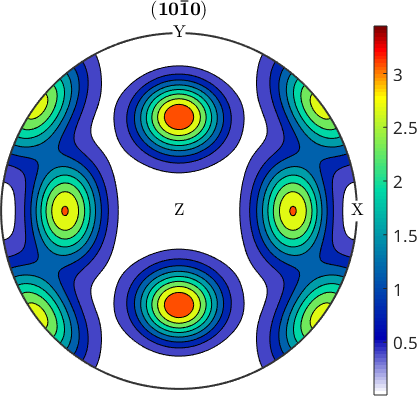
The second pole figure is symmetric about the horizontal and vertical specimen axes. The density is shared among the equivalent positions, so the peaks are lower than in the first plot.
textureIndexOrthorhombic = norm(odf)^2textureIndexOrthorhombic =
7.2683The second texture index is also smaller. Quantities derived from the ODF therefore change when specimen symmetry is imposed.
Specimen Symmetry and the Specimen Frame
A reference frame is the coordinate system in which data are expressed. A symmetry is the point group under which those data are invariant. The two are attached, but they are not the same concept.
Which physical direction a symmetry axis denotes depends on the specimen frame. The point group '112' has its twofold rotation about the \(z\) axis.
ss = specimenSymmetry('112')ss = monoclinic specimenSymmetry (y↑→x)The rolling frame names its axes RD, TD, and ND and supplies their plotting convention. Attaching it therefore declares that the twofold \(z\) axis is ND, and those names appear in summaries and plots.
ss.frame = specimenFrame.rolling;
ss
ss = monoclinic specimenSymmetry (TD←RD↑)Assigning a frame does not rotate an ODF or correct a mounting error. Use Sample Symmetry to test and align a measured texture before imposing a nontrivial symmetry.
References
- H.-J. Bunge, Texture Analysis in Materials Science: Mathematical Methods, Butterworths, English ed., 1982, develops ODFs with crystal and specimen symmetry.
- A. Morawiec, Orientations and Rotations: Computations in Crystallographic Textures, Springer, 2004, treats orientation space under crystal and specimen symmetries.
- U. F. Kocks, C. N. Tomé and H.-R. Wenk, Texture and Anisotropy: Preferred Orientations in Polycrystals and Their Effect on Materials Properties, Cambridge University Press, 1998.
- J. S. Kallend, U. F. Kocks, A. D. Rollett and H.-R. Wenk, Operational texture analysis, Materials Science and Engineering A 132 (1991), 1--11, treats quantitative texture analysis with general specimen symmetry.
- ISO 3785:2023, Metallic materials -- Designation of test specimen axes in relation to product texture, standardises how specimen directions are reported.
Next
Orientation Grids use symmetry to restrict sampling to the fundamental region. The ODF chapter develops texture characteristics and the consequences of imposing specimen symmetry on them.
Citing this page.
This page is part of the documentation of
MTEX, a free and open
source MATLAB toolbox for analyzing and modeling crystallographic textures.
It was written by The MTEX Developers and is published at
https://mtex-toolbox.github.io/SpecimenSymmetry.html.
If you use MTEX, or reuse text or figures from this page, in your research,
please cite
F. Bachmann, R. Hielscher, H. Schaeben: Texture Analysis with MTEX - Free and Open Source Software Toolbox, Solid State Phenomena 160 (2010), 63-68. 10.4028/www.scientific.net/SSP.160.63
BibTeX
@article{bachmann2010mtex,
  author  = {F. Bachmann and R. Hielscher and H. Schaeben},
  title   = {Texture Analysis with MTEX - Free and Open Source Software Toolbox},
  journal = {Solid State Phenomena},
  volume  = {160},
  pages   = {63-68},
  year    = {2010},
  doi     = {10.4028/www.scientific.net/SSP.160.63},
  url     = {https://doi.org/10.4028/www.scientific.net/SSP.160.63}
}
Other papers describing specific MTEX methods are listed under Publications — please cite the one that best fits your application. The MTEX source code is licensed under the GNU General Public License v2.0; the text and figures of this documentation are licensed under CC BY 4.0, which permits reuse — including by automated systems — provided The MTEX Developers and this page are credited.