
A function on the circle assigns a value to an in-plane angle \(\rho\). Its values repeat after \(2\pi\), so it is a \(2\pi\)-periodic function. Geometrically, its domain is also called the one-dimensional sphere \(\mathbb{S}^1\) or the one-dimensional torus.
The preceding Spherical Harmonics page introduced wave-like basis functions on the sphere. On the circle, only one integer mode remains, and the corresponding expansion is an ordinary Fourier series.
MTEX uses functions on the circle whenever a scalar quantity depends on an in-plane angle. Typical examples are
- angular density distributions of grain long axes or other in-plane shape directions,
- distributions of grain-boundary segment directions, optionally weighted by their segment lengths,
- caliper and projection lengths as functions of the projection direction, and
- azimuth-angle distributions of three-dimensional directions.
close allStart from an explicit formula
MTEX offers two complementary representations. An S1FunHandle evaluates an explicit formula whenever a value is requested. An S1FunHarmonic stores a finite set of Fourier coefficients.
Begin with the formula
\[ f(\rho)=1+\frac{1}{2}\cos(2\rho). \]
Pass the anonymous MATLAB function to S1FunHandle.
S1F = S1FunHandle(@(rho) 1 + 0.5*cos(2*rho))S1F = S1FunHandle
eval: @(rho)1+0.5*cos(2*rho)Plot the same function in two ways
A polar plot places each value along its angle. A Cartesian plot unfolds the circle and shows angle on the horizontal axis.
clf
subplot(1,2,1)
plot(S1F,'linewidth',2)
mtexTitle('Polar Plot')
subplot(1,2,2)
plot(S1F,'linewidth',2,'notPolar')
mtexTitle('Cartesian Plot')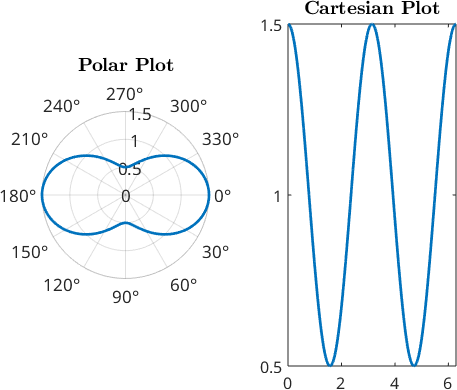
Read the two views
The Cartesian view makes the two maxima over one full turn easy to count. The polar view makes their opposite in-plane directions visible. Both panels show the same function, and neither changes its representation.
Construct a function from coefficients
Within S1FunHarmonic, the fhat property stores coefficients from mode \(-N\) through mode \(N\). It therefore contains an odd number of rows, and the centre row is the constant mode.
As an example, the following Fourier coefficients describe the real-valued function \(f(\rho)=4+\cos\rho+2\sin(2\rho)\).
fhat = [-1i; 0.5; 4; 0.5; 1i];
S1FCoeff = S1FunHarmonic(fhat)
coefficientMean = mean(S1FCoeff)

clf
subplot(1,2,1)
plot(S1FCoeff,'linewidth',2)
mtexTitle('Polar Plot')
subplot(1,2,2)
plot(S1FCoeff,'linewidth',2,'notPolar')
mtexTitle('Cartesian Plot')
S1FCoeff = S1FunHarmonic
bandwidth: 2
coefficientMean =
4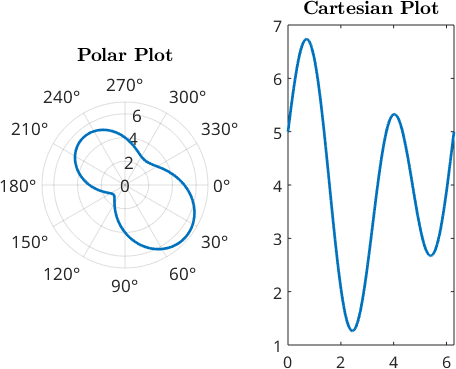
Read the coefficient example
The two coefficients of magnitude \(0.5\) form the cosine term. The outer imaginary coefficients form the sine term. A real-valued function has conjugate coefficients in opposite modes.
The centre entry is the mean value. In the vector as written it is 4, which is confirmed by coefficientMean.
Approximate a formula by a Fourier series
Constructing an S1FunHarmonic from an S1FunHandle computes the Fourier coefficients. The 'bandwidth' is the largest retained mode. A higher bandwidth generally improves the approximation but also increases the computational cost.
Computations with bandwidth 1024 are still very fast in practice and usually provide a good approximation. The much smaller bandwidth 20 is already sufficient for the smooth function below.
S1F = S1FunHandle(@(rho) exp(cos(rho)));
S1FH = S1FunHarmonic(S1F,'bandwidth',20)

rhoCheck = linspace(0,2*pi,1001).';
maxApproximationError = max(abs(S1F.eval(rhoCheck) - S1FH.eval(rhoCheck)))

clf
plot(S1F,'linewidth',2)
hold on
plot(S1FH,'--','linewidth',2)
hold off
legend('S1FunHandle','S1FunHarmonic')
S1FH = S1FunHarmonic
bandwidth: 20
even: true
maxApproximationError =
1.0658e-14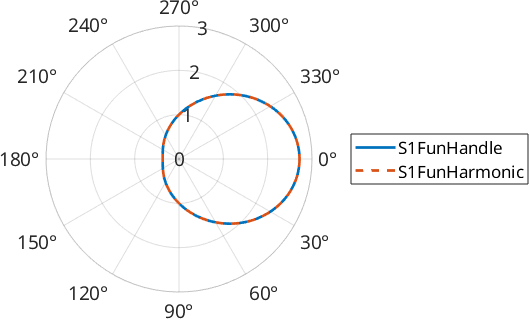
Read the approximation
The solid formula and dashed Fourier approximation overlap throughout the circle. The printed maximum error on the check grid is about \(1.1\mathbin{\times}10^{-14}\), so the remaining difference is at the scale of floating-point round-off.
Fit values sampled at angles
A function is often known only at a finite set of angles. S1FunHarmonic.interpolate constructs a periodic trigonometric polynomial from those samples. The result can be evaluated at arbitrary angles, plotted, differentiated, or used in later computations.
The bandwidth sets the number of Fourier modes in the interpolation. It should be large enough to resolve the measured angular variation. An unnecessarily large bandwidth can introduce oscillations or amplify noise.
rho = linspace(0,2*pi,11).';
values = 1 + cos(rho) + 2*sin(2*rho);

S1FI = S1FunHarmonic.interpolate(rho,values)
sampleResidual = max(abs(S1FI.eval(rho) - values))

clf
plot(rho,values,'x','displayName','samples')
hold on
plot(S1FI,'linewidth',2,'noPolar','displayName','periodic fit')
hold off
legend show
S1FI = S1FunHarmonic
bandwidth: 3
sampleResidual =
3.4361e-04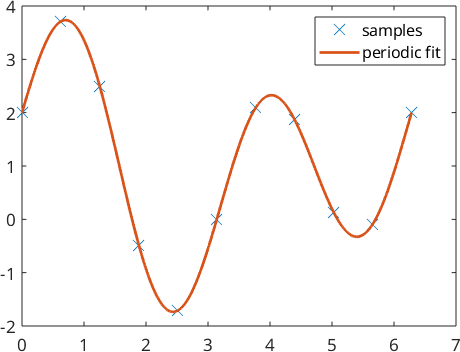
Read the sampled-data fit
The curve joins the angular trend and closes periodically between \(2\pi\) and zero. The default regularization leaves a maximum residual of about \(3.4\mathbin{\times}10^{-4}\) at these samples. Set bandwidth and regularization deliberately when the data contain noise or sharp changes.
Smooth small-scale oscillations
A harmonic function obtained from measured or interpolated data can contain small-scale oscillations or noise. smooth reduces those variations by convolution with an S1DeLaValleePoussinKernel.
The kernel halfwidth sets the angular scale of the smoothing. A small halfwidth preserves more local detail. A larger halfwidth produces a smoother function.
f = S1FunHandle(@(rho) 1 + cos(rho) + 0.4*cos(2*rho) + ...
  0.15*sin(20*rho) + 0.1*cos(35*rho));
f = S1FunHarmonic(f,'bandwidth',64);

fSmooth = f.smooth('halfwidth',8*degree);

clf
plot(f,'linewidth',2,'displayName','original')
hold on
plot(fSmooth,'linewidth',2,'displayName','smoothed')
hold off
legend show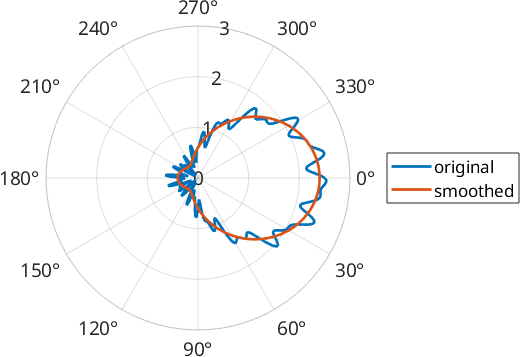
Read the smoothing result
The original curve has fine ripples from modes 20 and 35. The smoothed curve suppresses those ripples while retaining the broad mode-one and mode-two variation. Smoothing changes the function, so the halfwidth should be reported with any derived peak direction or density.
Compute integrals and extrema
Standard MATLAB operations apply directly to an S1FunHarmonic. Here S1FH is still the bandwidth-20 approximation of \(\exp(\cos\rho)\). mean returns its mean value, while sum returns its integral over the circle.
meanValue = mean(S1FH)
integralValue = sum(S1FH)
meanValue =
1.2661
integralValue =
7.9549 max and min return both the extreme value and its angular position.
[maxValue,maxPosition] = max(S1FH)
[minValue,minPosition] = min(S1FH)
extremePositionsDegree = [maxPosition,minPosition] ./ degree
maxValue =
2.7183
maxPosition =
0
minValue =
0.3679
minPosition =
3.1416
extremePositionsDegree =
0 180.0000Read the operations
The mean is about 1.2661, and the integral is about 7.9549. Their ratio is \(2\pi\). The maximum is \(\mathrm e\) at zero degrees, while the minimum is \(\mathrm e^{-1}\) at 180 degrees.
Estimate a density from angular data
Periodic functions also arise after density estimation from circular data. For example, rho is the azimuth angle of a three-dimensional direction. Passing these angles with the 'periodic' option makes calcDensity return an S1FunHarmonic.
rng default
v = vector3d.rand(1000);
fun = calcDensity(v.rho,'periodic')
densityMean = mean(fun)

clf
plot(fun,'linewidth',2)
fun = S1FunHarmonic
bandwidth: 59
densityMean =
1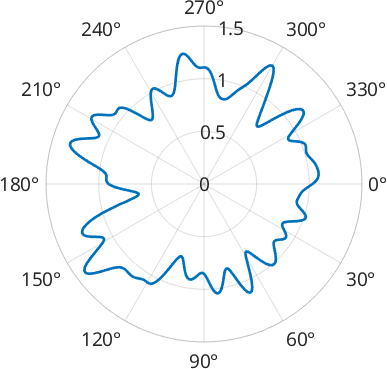
Read the angular density
The directions were sampled uniformly, so the density fluctuates around a flat value rather than forming a stable preferred direction. Its mean is one because calcDensity normalizes the periodic density. A pronounced reproducible peak would instead indicate a preferred azimuth.
The maths behind the Fourier representation
A \(2\pi\)-periodic function can be represented as a weighted sum of sines and cosines. MTEX uses the numerically convenient complex exponentials \(\mathrm e^{-\mathrm i k\rho}\). A finite series of bandwidth \(N\) is
\[ f(\rho)=\sum_{k=-N}^{N}\hat f_k\, \mathrm e^{-\mathrm i k\rho}, \qquad \rho\in[0,2\pi). \]
MTEX uses the coefficient convention
\[ \hat f_k=\frac{1}{2\pi}\int_0^{2\pi}f(\rho)\, \mathrm e^{\mathrm i k\rho}\,\mathrm d\rho. \]
The constant coefficient \(\hat f_0\) is therefore the mean value,
\[ \operatorname{mean}(f)=\frac{1}{2\pi}\int_0^{2\pi} f(\rho)\,\mathrm d\rho. \]
The integral returned by sum is
\[ \operatorname{sum}(f)=\int_0^{2\pi}f(\rho)\,\mathrm d\rho =2\pi\,\operatorname{mean}(f). \]
References
- H. Schaeben, The de la Vallee Poussin Standard Orientation Density Function, Textures and Microstructures 33 (1999), 365--373, relates the de la Vallee Poussin kernel to finite harmonic representations used for texture density estimation.
Next
Continue with Ellipse Based Shape Parameters to apply periodic density functions to grain long-axis and shortest-caliper directions.
Citing this page.
This page is part of the documentation of
MTEX, a free and open
source MATLAB toolbox for analyzing and modeling crystallographic textures.
It was written by The MTEX Developers and is published at
https://mtex-toolbox.github.io/S1FunHarmonics.html.
If you use MTEX, or reuse text or figures from this page, in your research,
please cite
F. Bachmann, R. Hielscher, H. Schaeben: Texture Analysis with MTEX - Free and Open Source Software Toolbox, Solid State Phenomena 160 (2010), 63-68. 10.4028/www.scientific.net/SSP.160.63
BibTeX
@article{bachmann2010mtex,
  author  = {F. Bachmann and R. Hielscher and H. Schaeben},
  title   = {Texture Analysis with MTEX - Free and Open Source Software Toolbox},
  journal = {Solid State Phenomena},
  volume  = {160},
  pages   = {63-68},
  year    = {2010},
  doi     = {10.4028/www.scientific.net/SSP.160.63},
  url     = {https://doi.org/10.4028/www.scientific.net/SSP.160.63}
}
Other papers describing specific MTEX methods are listed under Publications — please cite the one that best fits your application. The MTEX source code is licensed under the GNU General Public License v2.0; the text and figures of this documentation are licensed under CC BY 4.0, which permits reuse — including by automated systems — provided The MTEX Developers and this page are credited.