
A spherical vector field assigns a three-dimensional vector to every direction on the sphere. The input direction is a point in the field's domain; the output vector is the value stored there.
The output need not lie in the plane tangent to the sphere. For example, a general field may have radial and tangential parts. The gradient of a scalar S2Fun is a special case whose values are tangential.
MTEX represents this mapping with S2VectorField. This page constructs a harmonic representation, evaluates it, combines fields, and reads its two- and three-dimensional plots.
Constructing a field from a function
Define a function that keeps the \(x\) and \(y\) components of its input and sets the \(z\) component to zero. It accepts vector3d directions and returns vector3d values.
f = @(v) vector3d(v.x,v.y,0*v.x);Passing the handle to the constructor computes a harmonic approximation. The result is an S2VectorFieldHarmonic.
sVF2 = S2VectorFieldHarmonic(f,'bandwidth',4)sVF2 = S2VectorFieldHarmonic
bandwidth: 4The explicit quadrature call is equivalent.
sVF2q = S2VectorFieldHarmonic.quadrature(f,'bandwidth',4);Evaluate the field as one would evaluate a scalar spherical function. At specimen X the value is specimen X, whereas at specimen Z it vanishes.
[sVF2.eval(xvector),sVF2.eval(zvector)]ans = vector3d (y↓→x)
size: 1 × 2
x y z
1 0 0
0 0 0Constructing a field from sampled values
If directions and their vector values are already available, use interpolate. Here the samples come from the same function so that the two construction routes can be compared.
nodes = equispacedS2Grid('points',2000);
nodes = nodes(:);
values = f(nodes);

sVF1 = S2VectorFieldHarmonic.interpolate(nodes,values,'bandwidth',4)
sVF1 = S2VectorFieldHarmonic
bandwidth: 4The small maximum discrepancy on an independent grid comes from fitting the finite harmonic representation to sampled values.
probe = equispacedS2Grid('resolution',15*degree);

max(norm(sVF1.eval(probe) - sVF2.eval(probe)))
ans =
2.5572e-08Constructing a field from scalar components
A harmonic vector field stores its Cartesian components as an array of scalar S2FunHarmonic objects. Three entries supply the \(x\), \(y\), and \(z\) components directly.
xyzComponents = [sVF2.x,sVF2.y,sVF2.z];
sVF4 = S2VectorFieldHarmonic(xyzComponents)
sVF4 = S2VectorFieldHarmonic
bandwidth: 4Two entries supply \(x\) and \(y\), and the evaluator sets \(z\) to zero. Earlier documentation described the two entries as polar angle and azimuth; that is not the behaviour of the current constructor.
xyComponents = [sVF2.x,sVF2.y];
sVF3 = S2VectorFieldHarmonic(xyComponents)
sVF3 = S2VectorFieldHarmonic
bandwidth: 4Evaluating the two-component field makes the zero \(z\) component explicit.
sVF3.eval(xvector)ans = vector3d (y↓→x)
x y z
1 0 0Arithmetic and derived quantities
Addition and subtraction act pointwise. The second operand may be another vector field or one fixed vector3d.
sumField = sVF1 + sVF2;
shiftedField = sVF1 + vector3d(1,0,0);
differenceField = sVF1 - sVF2;
shiftedDifference = sVF2 - vector3d(sqrt(2)/2,sqrt(2)/2,0);
Multiplication and division by a scalar change every vector. Multiplying by an S2Fun gives each direction its own scalar weight.
scaledField = 2 .* sVF1;
reducedField = sVF1 ./ 4;
weight = S2FunHarmonic.quadrature(@(v) 1+0.2*v.z,'bandwidth',2);
weightedField = sVF1 .* weight;
A pointwise dot product returns a scalar S2Fun. Its second operand may be a vector field or one fixed vector.
fieldDot = dot(sVF1,sVF2);
verticalComponent = dot(sVF1,vector3d(0,0,1));
A pointwise cross product returns another vector field and accepts the same two kinds of second operand.
fieldCross = cross(sVF1,sVF2);
crossWithZ = cross(sVF1,vector3d(0,0,1));
mean returns one mean vector3d. norm returns the scalar function of pointwise vector lengths.
meanVector = mean(sVF1)
lengthFunction = norm(sVF1)
meanVector = vector3d (y↓→x)
x y z
-3.27e-08 0 0
lengthFunction = S2FunHarmonic (y↓→x)
bandwidth: 128
antipodal: trueRotating a field moves both its argument directions and its vector values.
r = rotation.byEuler([pi/4 0 0]);
rotatedField = rotate(sVF1,r);
Visualizing direction and magnitude
Fix the plotting convention so specimen X points right and specimen Y points up. The default plot command draws a projected quiver plot; quiver is an alias.
plottingConvention.default('y↑→x');
plot(sVF2,'upper','resolution',15*degree)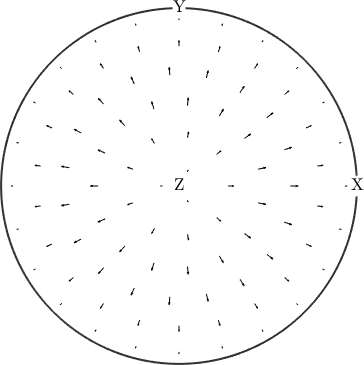
Arrows are shortest near specimen Z and lengthen towards the equator. Their length shows the field magnitude, while their arrowhead shows the sense of each vector.
quiver3 attaches the same arrows to a three-dimensional sphere.
clf
quiver3(sVF2,'resolution',15*degree)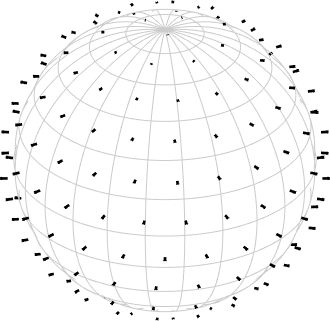
The sphere shows the input directions, not a surface that constrains the output. Arrows can therefore point away from the tangent plane. This is the visual distinction between a general vector field and a tangential field such as a gradient.
References
- W. Freeden and M. Schreiner, Spherical Functions of Mathematical Geosciences: A Scalar, Vectorial, and Tensorial Setup, Springer, 2009, develops harmonic representations of vector fields on the sphere.
Next
Spherical Axis Fields treats values without a sense, for which a vector and its negative represent the same axis.
Citing this page.
This page is part of the documentation of
MTEX, a free and open
source MATLAB toolbox for analyzing and modeling crystallographic textures.
It was written by The MTEX Developers and is published at
https://mtex-toolbox.github.io/S2FunVectorField.html.
If you use MTEX, or reuse text or figures from this page, in your research,
please cite
F. Bachmann, R. Hielscher, H. Schaeben: Texture Analysis with MTEX - Free and Open Source Software Toolbox, Solid State Phenomena 160 (2010), 63-68. 10.4028/www.scientific.net/SSP.160.63
BibTeX
@article{bachmann2010mtex,
  author  = {F. Bachmann and R. Hielscher and H. Schaeben},
  title   = {Texture Analysis with MTEX - Free and Open Source Software Toolbox},
  journal = {Solid State Phenomena},
  volume  = {160},
  pages   = {63-68},
  year    = {2010},
  doi     = {10.4028/www.scientific.net/SSP.160.63},
  url     = {https://doi.org/10.4028/www.scientific.net/SSP.160.63}
}
Other papers describing specific MTEX methods are listed under Publications — please cite the one that best fits your application. The MTEX source code is licensed under the GNU General Public License v2.0; the text and figures of this documentation are licensed under CC BY 4.0, which permits reuse — including by automated systems — provided The MTEX Developers and this page are credited.