
smooth grain boundary curves or surfaces.
Syntax
smoothed = smoothBoundary(grains)
Description
For an MTEX object, smoothBoundary(x, …) calls x.smoothBoundary(…). Additional positional and keyword arguments are passed to that method unchanged. Its documentation specifies the accepted inputs, units, symmetry handling and optional outputs. Consult the corresponding method for the behaviour of a particular object type.
Example
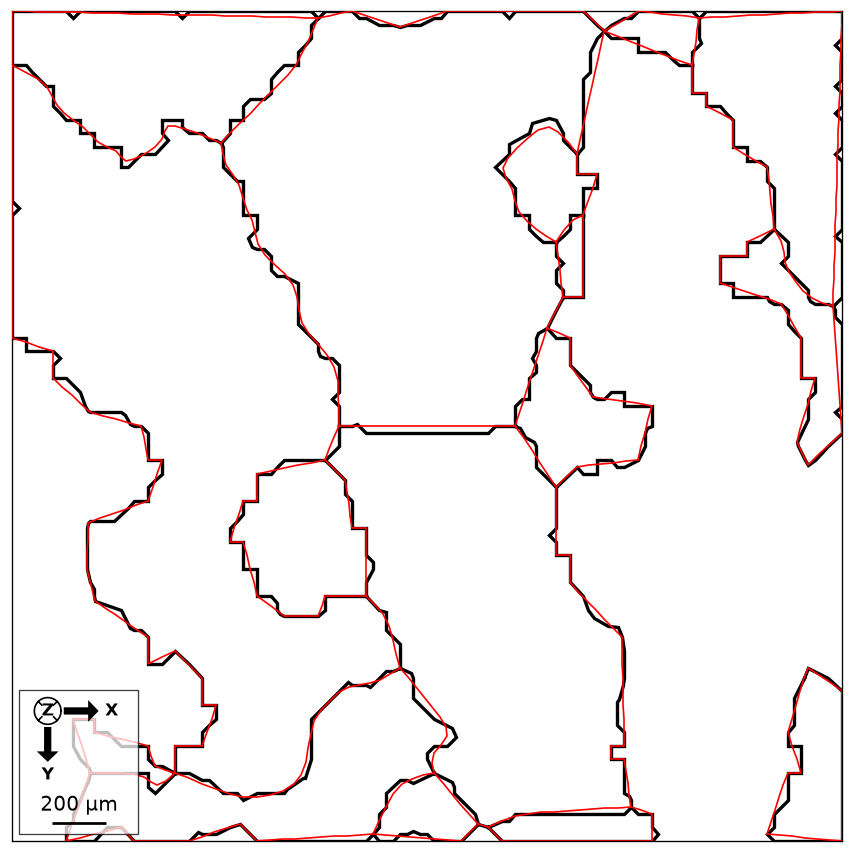
Compare reconstructed and smoothed boundaries on the small Forsterite sample. The sample file is downloaded and cached on first use.
import matplotlib.pyplot as plt
from mtex import mtexdata, calcGrains, smoothBoundary, degree, plot, hold

ebsd = mtexdata('small', verbose=False)['Forsterite']
grains = calcGrains(ebsd, angle=10*degree, minPixel=5)
smoothed = smoothBoundary(grains, 5)
plot(grains.boundary, lineColor='black', lineWidth=2, displayName='Reconstructed')
hold(True)
plot(smoothed.boundary, lineColor='red', lineWidth=1, displayName='Smoothed')
hold(False)
print('Grains before and after:', grains.size, smoothed.size)
plt.show()
Black shows the pixel-derived outlines and red the smoothed geometry. Smoothing changes the curves, while the pixel grain ids and the grain membership remain those of the reconstruction.
Grains before and after: 15 15
Signature
smoothBoundary(x, *args, **kwargs)
Methods it calls
| grain2d | the grains with the pixel staircase of their boundaries turned into smooth curves |
| grain3d | the grains with their boundary surfaces smoothed, hierarchically: the triple lines along themselves first, then the faces |
Used on
CrystalShapes, EBSD3Analysis, Grains3DBoundaries, Grains3DSmoothing, EBSDDenoising, EBSDFilling, EBSDGROD, EBSDGrid, EBSDIPFMap, EBSDKAM, EBSDSharpPlot, BoundaryCurvature
source
Citing this page.
This page is part of the documentation of
MTEX, a free and open
source MATLAB toolbox for analyzing and modeling crystallographic textures.
It was written by The MTEX Developers and is published at
https://mtex-toolbox.github.io/smoothBoundary_py.html.
If you use MTEX, or reuse text or figures from this page, in your research,
please cite
F. Bachmann, R. Hielscher, H. Schaeben: Texture Analysis with MTEX - Free and Open Source Software Toolbox, Solid State Phenomena 160 (2010), 63-68. 10.4028/www.scientific.net/SSP.160.63
BibTeX
@article{bachmann2010mtex,
  author  = {F. Bachmann and R. Hielscher and H. Schaeben},
  title   = {Texture Analysis with MTEX - Free and Open Source Software Toolbox},
  journal = {Solid State Phenomena},
  volume  = {160},
  pages   = {63-68},
  year    = {2010},
  doi     = {10.4028/www.scientific.net/SSP.160.63},
  url     = {https://doi.org/10.4028/www.scientific.net/SSP.160.63}
}
Other papers describing specific MTEX methods are listed under Publications — please cite the one that best fits your application. The MTEX source code is licensed under the GNU General Public License v2.0; the text and figures of this documentation are licensed under CC BY 4.0, which permits reuse — including by automated systems — provided The MTEX Developers and this page are credited.