
A method of grain2d.
the grains with the pixel staircase of their boundaries turned into smooth curves; MATLAB’s grain2d.smoothBoundary
Syntax
grains = smoothBoundary(grains)
One smoothing step.
grains = smoothBoundary(grains, 5, moveTriplePoints=True)
Five steps, the junctions moving too.
grains = smoothBoundary(grains, 3, simplify=False, refine=False)
The segments kept, smoothing only.
grains = smoothBoundary(grains, 3, simplify=0.5, refine=1)
Own tolerance and resampling length.
grains = smoothBoundary(grains, taubinFilter())
Smoothing without shrinking.
grains = smoothBoundary(grains, curvatureFilter(smoothingLength=3))
A smoothing length.
Description
calcGrains gives a boundary as a staircase of pixel edges, every segment along a grid axis. The smoothing repairs it in three steps:
- simplify: drops every vertex whose removal moves the boundary by less than a tolerance, by default d / sqrt(2) for the pixel spacing d, which removes the staircase and nothing else.
- refine: resamples what is left at equal arc length, by default d, so that the vertices are evenly spaced and no longer tied to the grid.
- the boundaryFilter smooths, by default laplaceFilter(iter), iter steps of local averaging.
The first two steps matter: simplifying alone leaves a curve as a few long chords whose corners the smoothing cuts off, and smoothing alone leaves straight boundaries scattered around the grid axes. They change the segments, though, and a resampled segment no longer lies between one pair of pixels: where gB.ebsdId is read per segment, as calcGBND does, switch them off with simplify=False, refine=False.
The junctions (triple and quadruple points, and the ends of the inner boundary on the outer one) stay fixed unless moveTriplePoints=True, the outer boundary of the map unless moveOuterBoundary=True. MATLAB’s second output, the filter used, is the one passed or laplaceFilter(iter).
Input
grains |
grain2d |
iter |
the number of smoothing steps of the default laplaceFilter, or the boundaryFilter to smooth with: laplaceFilter, taubinFilter, curvatureFilter or huberFilter |
Keywords
| keyword | default | description |
|---|---|---|
simplify |
None |
the tolerance of the simplification in the units of the map, by default d / sqrt(2) for the pixel spacing d; False leaves it out, MATLAB’s ‘noSimplify’ |
refine |
None |
the resampling length in the units of the map, by default d; False leaves it out, MATLAB’s ‘noRefine’ |
moveTriplePoints |
False |
smooth the junctions as well |
moveOuterBoundary |
False |
smooth the outer boundary of the map as well |
Output
grains |
grain2d with the smoothed boundary and inner boundary |
Example
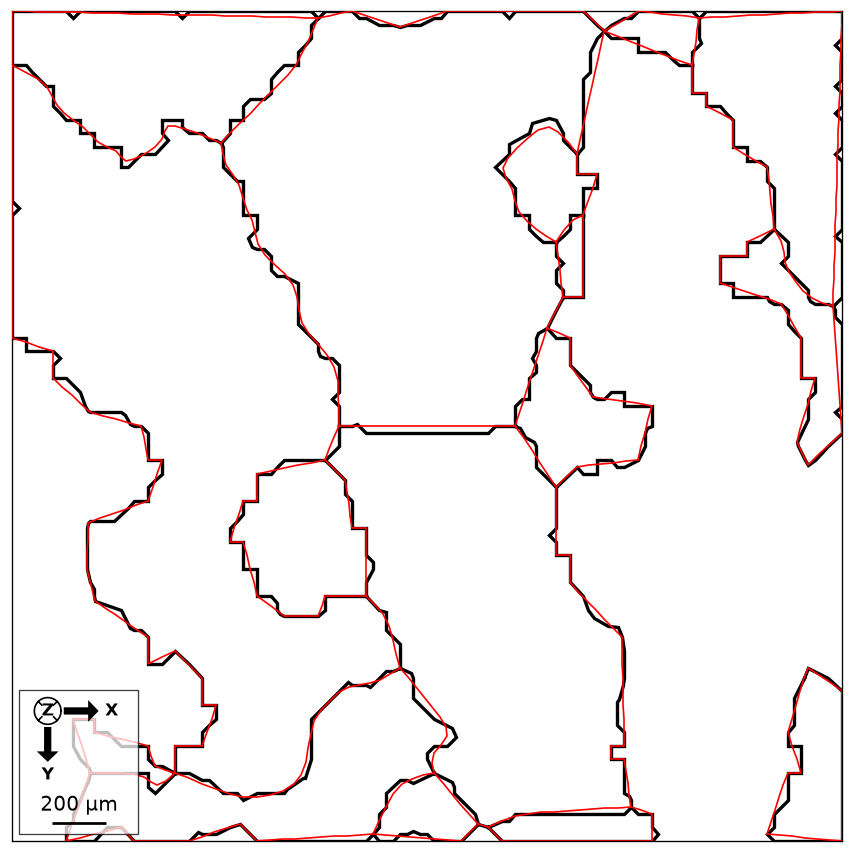
Compare reconstructed and smoothed boundaries on the small Forsterite sample. The sample file is downloaded and cached on first use.
import matplotlib.pyplot as plt
from mtex import mtexdata, calcGrains, smoothBoundary, degree, plot, hold

ebsd = mtexdata('small', verbose=False)['Forsterite']
grains = calcGrains(ebsd, angle=10*degree, minPixel=5)
smoothed = smoothBoundary(grains, 5)
plot(grains.boundary, lineColor='black', lineWidth=2, displayName='Reconstructed')
hold(True)
plot(smoothed.boundary, lineColor='red', lineWidth=1, displayName='Smoothed')
hold(False)
print('Grains before and after:', grains.size, smoothed.size)
plt.show()
Black shows the pixel-derived outlines and red the smoothed geometry. Smoothing changes the curves, while the pixel grain ids and the grain membership remain those of the reconstruction.
Grains before and after: 15 15
See also
grain2d.simplifyBoundary, grain2d.refineBoundary, grain2d.reduceBoundary, boundaryFilter, laplaceFilter, taubinFilter, curvatureFilter, huberFilter, GrainSmoothing
MATLAB’s grain2d.smoothBoundary
source
Citing this page.
This page is part of the documentation of
MTEX, a free and open
source MATLAB toolbox for analyzing and modeling crystallographic textures.
It was written by The MTEX Developers and is published at
https://mtex-toolbox.github.io/grain2d.smoothBoundary_py.html.
If you use MTEX, or reuse text or figures from this page, in your research,
please cite
F. Bachmann, R. Hielscher, H. Schaeben: Texture Analysis with MTEX - Free and Open Source Software Toolbox, Solid State Phenomena 160 (2010), 63-68. 10.4028/www.scientific.net/SSP.160.63
BibTeX
@article{bachmann2010mtex,
  author  = {F. Bachmann and R. Hielscher and H. Schaeben},
  title   = {Texture Analysis with MTEX - Free and Open Source Software Toolbox},
  journal = {Solid State Phenomena},
  volume  = {160},
  pages   = {63-68},
  year    = {2010},
  doi     = {10.4028/www.scientific.net/SSP.160.63},
  url     = {https://doi.org/10.4028/www.scientific.net/SSP.160.63}
}
Other papers describing specific MTEX methods are listed under Publications — please cite the one that best fits your application. The MTEX source code is licensed under the GNU General Public License v2.0; the text and figures of this documentation are licensed under CC BY 4.0, which permits reuse — including by automated systems — provided The MTEX Developers and this page are credited.