
A map of a natural rock or a sintered material rarely consists of grains alone. Wherever a pattern could not be indexed, the map is notIndexed. On a polished section that happens at cracks, at pores and where material was plucked out during polishing. These regions are of different kinds, and grain reconstruction should treat them differently.
- A pore inside a grain is a hole in that grain. The grain continues around it, and its area belongs to the grain.
- A crack that opened after the rock formed cuts grains into pieces. The pieces on its two sides are parts of the same grains.
- A wide region with no indexed material, such as the border of a sample or a large void, is not part of any grain.
This page shows how calcGrains treats each of them, and which options give control over the result. It assumes the basic reconstruction from Grain Reconstruction, in particular the option 'alpha'.
The data
The map is a thin section of a peridotite, a mantle rock made mainly of olivine (forsterite), orthopyroxene (enstatite) and clinopyroxene (diopside). The step size is 60 micron, so the map is about 33 mm wide. The data are courtesy of David Mainprice, Géosciences Montpellier.
mtexdata peridotite silent

plot(ebsd,'micronbar','off')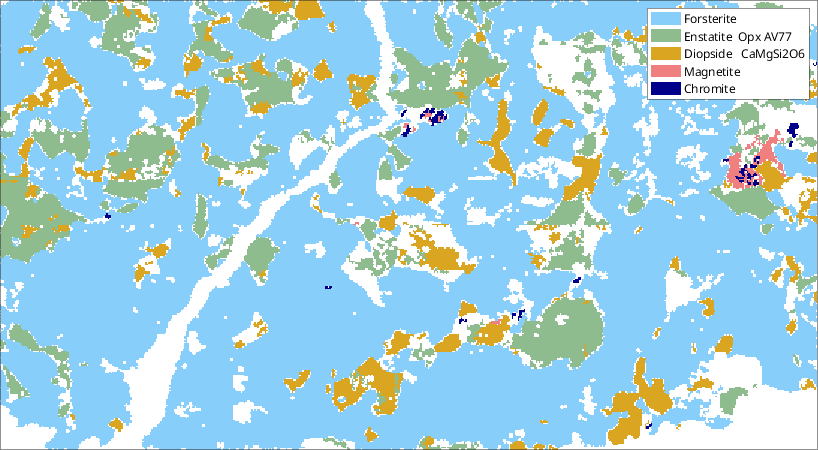
The white regions are notIndexed. A crack crosses the left half of the map from the bottom edge to the top edge. It is wide in its lower part and narrow in its upper part. Round pores sit inside some of the large forsterite grains, and irregular pockets lie between the grains.
Pores, pockets and the outer boundary
We reconstruct the grains with the default alpha, which closes notIndexed regions narrower than about six pixels. The second output is the map with the grainId of every pixel. We keep it apart from ebsd, so that the reconstructions below start from the measured map.
[grains,ebsdGrains] = calcGrains(ebsd,'angle',10*degree,'minPixel',5);Every notIndexed region that survives the closing is either a notIndexed grain, or it touches the border of the map and lies outside all grains. Such a region is bounded by the outer boundary: the boundary between the grains and the area not covered by any grain. Its pixels get the grainId 0.
A notIndexed grain enclosed by a single grain is a pore of that grain. The command isInclusion finds them.
isPore = grains.isInclusion & ~grains.isIndexed;
isPocket = ~grains.isIndexed & ~isPore;

plot(grains,'micronbar','off')
hold on
plot(grains(isPore),'FaceColor','red','DisplayName','pore')
plot(grains(isPocket),'FaceColor','black','DisplayName','pocket')
hold off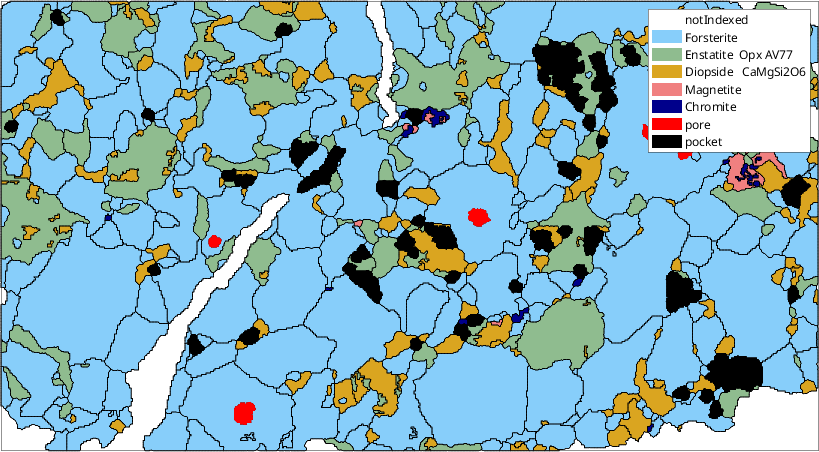
Red marks the notIndexed grains enclosed by one grain, and black those between several grains. The crack is white. It reaches the border of the map and is therefore outside all grains. The grains on its two sides do not touch, and so they are never compared. The closing has bridged the crack only in its middle, where it is narrowest.
fprintf('%d pores, %d pockets, %.1f%% of the map outside all grains\n', ...
  nnz(isPore), nnz(isPocket), 100*nnz(ebsdGrains.grainId==0)/length(ebsd))
5 pores, 42 pockets, 9.8% of the map outside all grainsThe effect of alpha
A larger alpha closes wider notIndexed regions. We repeat the reconstruction for increasing values, and look at the lower part of the crack. The background is the second output of calcGrains. In it, every notIndexed pixel absorbed by a grain has the phase of that grain, so the white pixels are those outside all grains or in a notIndexed grain.
alpha = [1 3.1 6 10];

newMtexFigure('layout',[2 2]);
for k = 1:numel(alpha)
  [grainsA,ebsdA] = calcGrains(ebsd,'angle',10*degree,'minPixel',5, ...
    'alpha',alpha(k));
  nextAxis
  plot(ebsdA,'micronbar','off')
  legend off
  hold on
  plot(grainsA.boundary,'linewidth',1)
  hold off
  axis([2500 12500 7000 17940])
  mtexTitle(['alpha = ' num2str(alpha(k))])
  fprintf('alpha = %4.1f: %3d grains, %3d notIndexed, %4.1f%% outside\n', ...
    alpha(k), length(grainsA), length(grainsA('notIndexed')), ...
    100*nnz(ebsdA.grainId==0)/length(ebsdA))
end
alpha = 1.0: 762 grains, 198 notIndexed, 10.4% outside
alpha = 3.1: 580 grains, 47 notIndexed, 9.8% outside
alpha = 6.0: 523 grains, 7 notIndexed, 8.5% outside
alpha = 10.0: 518 grains, 3 notIndexed, 7.2% outside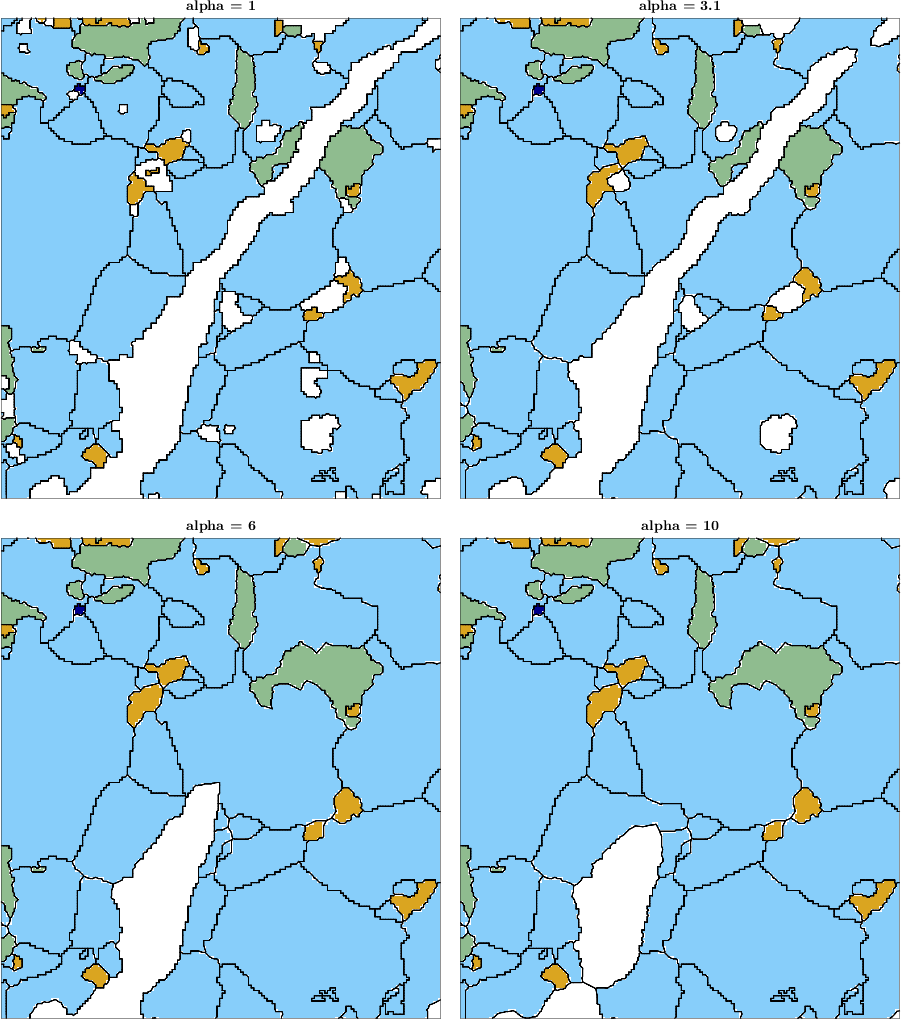
With alpha = 1 many notIndexed specks between the grains remain grains of their own. The default alpha = 3.1 absorbs those specks, and keeps the pores, the pockets and the crack. With alpha = 6 the pores and almost all pockets of the map are gone, and the narrow upper part of the crack is closed. With alpha = 10 only the widest part of the crack near the bottom edge remains open.
No single value treats all regions as we would like. The value that closes the crack also absorbs every pore and pocket of the map into the neighbouring grains, whether or not they belong there.
Grains across the crack
Closing the crack connects the grains on its two sides. Where both sides have nearly the same orientation, they become one grain. Where they differ by more than the threshold angle, a new boundary runs through the crack.
We compare the grains with alpha = 10 to the default ones. The pixels of the crack are outside all grains by default, and inside one with alpha = 10.
[grains10,ebsd10] = calcGrains(ebsd,'angle',10*degree,'minPixel',5, ...
  'alpha',10);

inCrack = ebsdGrains.grainId == 0 & ebsd10.grainId > 0;
For each grain that covers a part of the crack, we count how many of its pixels belong to each of the default grains. Two default grains with more than 200 pixels each are the two pieces of a grain that the crack cut.
isJoined = false(size(grains10));
for id = unique(ebsd10.grainId(inCrack)).'
  [pieces,~,j] = unique(ebsdGrains.grainId(ebsd10.grainId == id & ...
    ebsdGrains.isIndexed));
  pieces = pieces(accumarray(j,1) > 200);
  if numel(pieces) < 2, continue, end
  isJoined(grains10.id2ind(id)) = true;
  fprintf('%s: two pieces with misorientation %.1f°\n', ...
    grains10('id',id).mineral, angle(grains('id',pieces(1)).meanOrientation, ...
    grains('id',pieces(2)).meanOrientation) / degree)
end
Forsterite: two pieces with misorientation 1.7°
Forsterite: two pieces with misorientation 1.9°The joined pieces differ by less than two degrees. They are therefore parts of single forsterite grains which the crack cut in two. We highlight them on the map.
plot(ebsd,'micronbar','off')
legend off
hold on
plot(grains10(isJoined),'FaceColor','black','FaceAlpha',0.4)
plot(grains10.boundary,'linewidth',1)
hold off
axis([2500 12500 7000 17940])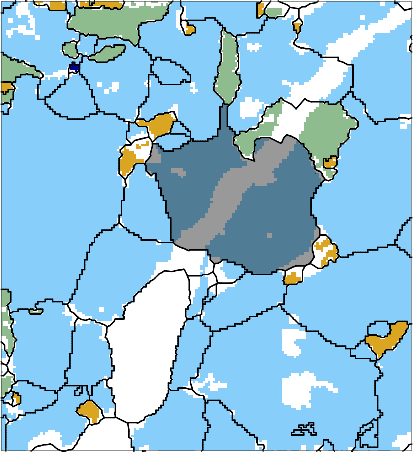
The darkened grains extend across the crack, which shows through them as a lighter band. All other grains next to the crack now meet their neighbour from the other side at a boundary inside the crack. Those boundaries are not measured. They lie where the closing happened to put them.
Pores as part of their grain
A pore does not need a large alpha to become part of its grain. The command merge with the option 'inclusions' merges every inclusion into the grain that encloses it. A second argument restricts it to notIndexed inclusions, so that indexed inclusions such as the small chromite grains remain grains of their own.
[grainsMerged,parentId] = merge(grains,'inclusions',~grains.isIndexed);

plot(grainsMerged,'micronbar','off')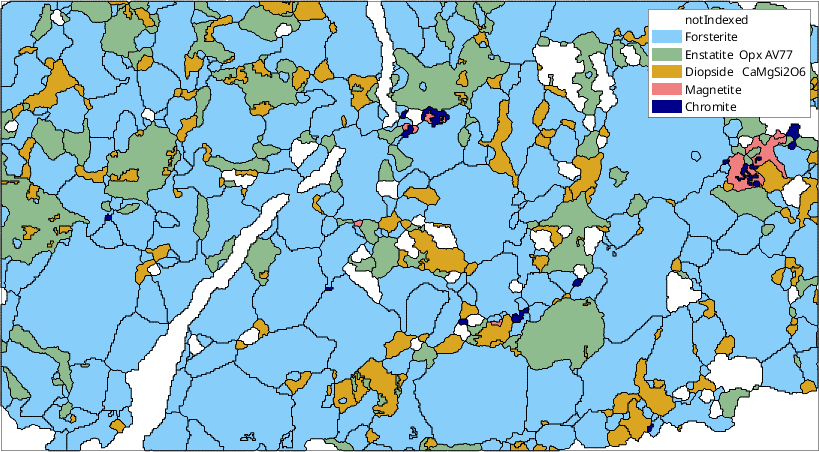
The round pores inside the forsterite grains are gone, while the crack and the pockets between several grains are kept. Merging acts on what encloses a region and not on its width. It therefore merges pores of any size, while the crack stays open.
parentId gives for every original grain the id of the grain it is now part of. The area of a merged grain includes its pores. Here they are a small part of it.
poreIds = grains.id(isPore);
hostArea = grainsMerged('id',parentId(grains.id2ind(poreIds))).area;
poreArea = grains('id',poreIds).area;
fprintf('the pores make up %.1f%% of the area of their host grains\n', ...
  100*sum(poreArea)/sum(hostArea))
the pores make up 1.9% of the area of their host grainsSmoothing the outer boundary
A crack or a pocket at the map border is bounded by the outer boundary. It has the same pixel staircase as every other boundary. The command smoothBoundary smooths it together with the grain boundaries. Junctions on the outer boundary, where a grain boundary meets it, and the corners of its convex hull stay where they are. The map therefore keeps its extent.
grainsSmooth = smoothBoundary(grainsMerged,5);

plot(grainsSmooth,'micronbar','off')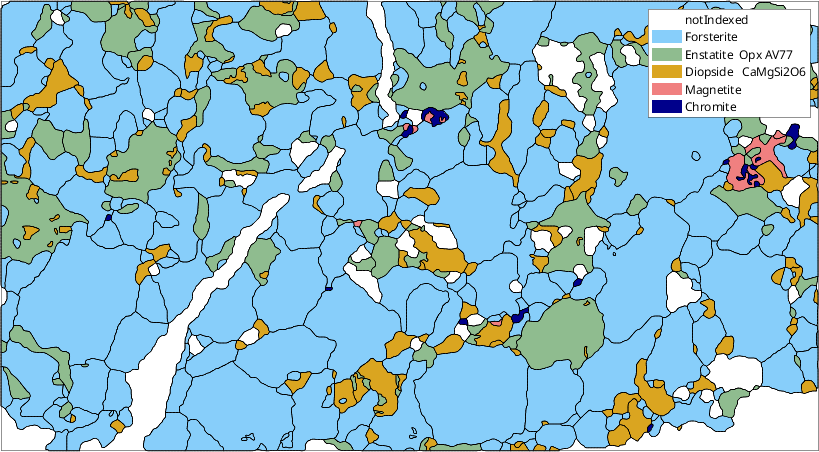
The edges of the cracks and of the region at the bottom right are now smooth curves, just like the grain boundaries.
Recommended procedure
A map with cracks and pores is best reconstructed in three steps.
- Choose
alphafor the specks between the grains. The default is usually right. Check that the cracks you want to keep remain open. - Merge
notIndexedinclusions into the enclosing grains withmerge(grains,'inclusions',~grains.isIndexed). - Smooth all boundaries with
smoothBoundary.
Close a crack with a large alpha only if the grains on its two sides should be counted as one, and accept that this also closes all smaller regions of the map.
References
- F. Bachmann, R. Hielscher, and H. Schaeben, Grain Detection from 2d and 3d EBSD Data---Specification of the MTEX Algorithm, Ultramicroscopy 111 (2011), 1720--1733. This paper derives the Voronoi reconstruction used by
calcGrains, including the closing ofnotIndexedregions.
Next
Merging Grains explains merging grains by other criteria, such as a twin relationship. Grain Boundary Smoothing compares the smoothing filters. To estimate orientations inside pores and cracks rather than only assigning them to grains, see Fill Missing Data in Orientation Maps.
Citing this page.
This page is part of the documentation of
MTEX, a free and open
source MATLAB toolbox for analyzing and modeling crystallographic textures.
It was written by The MTEX Developers and is published at
https://mtex-toolbox.github.io/GrainReconstructionCracks.html.
If you use MTEX, or reuse text or figures from this page, in your research,
please cite
F. Bachmann, R. Hielscher, H. Schaeben: Texture Analysis with MTEX - Free and Open Source Software Toolbox, Solid State Phenomena 160 (2010), 63-68. 10.4028/www.scientific.net/SSP.160.63
BibTeX
@article{bachmann2010mtex,
  author  = {F. Bachmann and R. Hielscher and H. Schaeben},
  title   = {Texture Analysis with MTEX - Free and Open Source Software Toolbox},
  journal = {Solid State Phenomena},
  volume  = {160},
  pages   = {63-68},
  year    = {2010},
  doi     = {10.4028/www.scientific.net/SSP.160.63},
  url     = {https://doi.org/10.4028/www.scientific.net/SSP.160.63}
}
Other papers describing specific MTEX methods are listed under Publications — please cite the one that best fits your application. The MTEX source code is licensed under the GNU General Public License v2.0; the text and figures of this documentation are licensed under CC BY 4.0, which permits reuse — including by automated systems — provided The MTEX Developers and this page are credited.