
An option changes one command. A preference supplies a
default for the whole MTEX session. Preferences are read with getMTEXpref and set with
setMTEXpref; MATLAB keeps its startup values in the central file mtex_settings.m, which
the port does not have (see below).
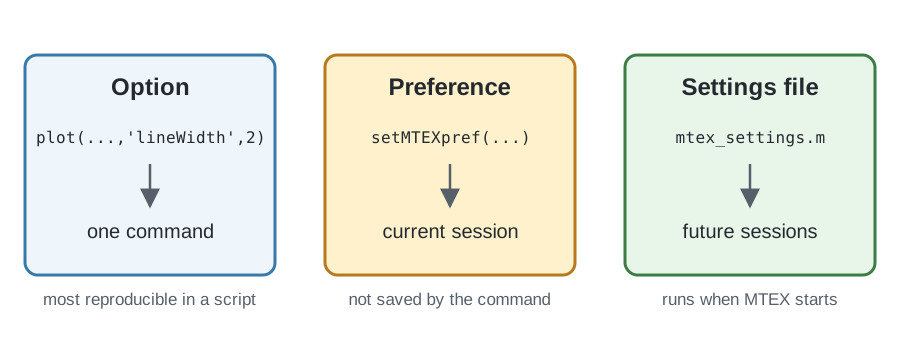
The diagram separates the three scopes. An option is local to one command, while
setMTEXpref changes the current session. MATLAB’s mtex_settings.m makes a setting take
effect when MTEX starts in future sessions.
Inspect the current preferences
Pass a preference name to getMTEXpref to read its current value. With no input, the
function returns a dict containing all current preferences. A preference that has not been
set is read as None, or as the default a second argument names; the commands that use it
supply their own default then.
from mtex import *

getMTEXpref()
{'EulerAngleConvention': 'Bunge', 'UTF8Output': True, 'degreeChar': '°', 'FontSize': 13, 'markerSize': 10, 'stopOnSymmetryMissmatch': True, 'maxS1Bandwidth': 1024, 'maxS2Bandwidth': 512, 'maxSO3Bandwidth': 64, 'defaultS2Bandwidth': 128, 'defaultSO3Bandwidth': 64, 'FFTAccuracy': 0.01, 'displayRows': 20, 'hugePages': 'auto'}
Change one preference temporarily
For example, getMTEXpref('FontSize') reads the current default font size, while
setMTEXpref('FontSize', 14) would change it to 14 for this session. Documentation scripts
should not change global figure preferences, so the executable example instead uses the
preference for UTF-8 output.
The sequence saves the current value, changes it, reads the changed value, and restores the original. Keeping the restoration in the same section makes the example safe to run repeatedly.
oldUTF8Output = getMTEXpref('UTF8Output')
setMTEXpref('UTF8Output', False)
print(getMTEXpref('UTF8Output'))
setMTEXpref('UTF8Output', oldUTF8Output)
False
Make a preference persistent
MATLAB runs mtex_settings.m at startup, so an active setting there applies to every later
session. The port reads no settings file: every session starts from the defaults, and
mtex.reset() returns to them. A setting meant for every session is a setMTEXpref call in
a module of your own that your scripts import first, or in the file PYTHONSTARTUP names
for interactive sessions:
# my_mtex_settings.py
from mtex import setMTEXpref
setMTEXpref('FontSize', 14)
The preferences the port reads include:
FontSizeandmarkerSize, the font size and the marker size of every plot;showMicronBarandshowRefFrame, whether an EBSD map shows a micron bar and a reference-frame indicator;defaultColorMap, the default colormap;EulerAngleConvention, the Euler-angle convention, which is Bunge by default;mtexDataPath, the folder the sample data sets are fetched into;gridifyOnImport, whether an imported map is gridified on import;stopOnSymmetryMissmatch, whether a symmetry mismatch stops with an error;kernels,threads,NUFFTandNFFTLibrary, the compiled loops, the number of threads and the optional third-party transform used for the harmonic transforms;defaultS2Bandwidth,defaultSO3Bandwidth, the harmonic degree a callable or values at nodes are expanded to when nobandwidthis given;maxS2Bandwidth,maxSO3Bandwidth, the largest degree of a result whose degree is known, as the sum of the degrees in a product.
Keep scripts reproducible
setMTEXpref changes only the running session. A settings module imported at the start of
a script makes the same MTEX script behave differently on another
computer that does not have it. A script shared or published for others should therefore
pass important settings as command options where possible instead of assuming a local
configuration.
Plot alignment is not an ordinary preference
The alignment of plots is no longer an ordinary preference. It belongs to the reference frame in which the data is expressed. A reference frame identifies the coordinate system and basis of the data; it is distinct from the symmetry attached to that frame.
The frame supplies a plotting convention that determines how its axes are laid out on screen. See On-Screen Coordinate System Alignment to set that convention explicitly instead of relying on a legacy axis-direction preference.
References
This page documents MTEX configuration behavior and does not rely on an external method reference.
Next
Continue with Vectors to create the basic geometric objects used for directions, axes, and positions throughout MTEX.
Citing this page.
This page is part of the documentation of
MTEX, a free and open
source MATLAB toolbox for analyzing and modeling crystallographic textures.
It was written by The MTEX Developers and is published at
https://mtex-toolbox.github.io/GeneralConceptsConfiguration_py.html.
If you use MTEX, or reuse text or figures from this page, in your research,
please cite
F. Bachmann, R. Hielscher, H. Schaeben: Texture Analysis with MTEX - Free and Open Source Software Toolbox, Solid State Phenomena 160 (2010), 63-68. 10.4028/www.scientific.net/SSP.160.63
BibTeX
@article{bachmann2010mtex,
  author  = {F. Bachmann and R. Hielscher and H. Schaeben},
  title   = {Texture Analysis with MTEX - Free and Open Source Software Toolbox},
  journal = {Solid State Phenomena},
  volume  = {160},
  pages   = {63-68},
  year    = {2010},
  doi     = {10.4028/www.scientific.net/SSP.160.63},
  url     = {https://doi.org/10.4028/www.scientific.net/SSP.160.63}
}
Other papers describing specific MTEX methods are listed under Publications — please cite the one that best fits your application. The MTEX source code is licensed under the GNU General Public License v2.0; the text and figures of this documentation are licensed under CC BY 4.0, which permits reuse — including by automated systems — provided The MTEX Developers and this page are credited.