
construct a convex crystal morphology from symmetry-related lattice planes.
Syntax
cS = crystalShape(N)
Construct from face normals in a crystal frame.
cS = crystalShape(N, habitus=1, extension=(1, 1, 2))
Modify the relative distances of the crystal forms.
cS = crystalShape.hex(cs)
Construct a hexagonal prism in the frame cs.
cS = crystalShape.quartz(simple=True)
Use a simplified shape from the mineral catalogue.
Description
Each supplied Miller normal represents a crystal form: all its symmetry equivalents are generated using the point group of its crystal frame. The shape is the bounded intersection of the half spaces dot(vertex, normal) <= 1. Before the common display scaling, a face is therefore 1/norm(normal) from the origin. Lengthening a normal moves its planes inward; shortening it can move them so far outward that other planes exclude those faces entirely. Supply enough forms to enclose a finite volume.
The optional habitus and extension parameters adjust relative plane distances using
the Miller indices. For habitus p > 0, a normal with indices (h, k, l) is divided by
((abs(h)*extension[0])**p + (abs(k)*extension[1])**p +
(abs(l)*extension[2])**p)**(1/p)
before symmetry expansion. With habitus=0 this step
is skipped and extension has no effect. This changes the morphology rather than
assigning an absolute size.
The vertices are initially scaled so that their largest distance from the origin is 0.5. For a centrally symmetric crystal this gives diameter one. Read or assign diameter to set a particular size, or multiply the shape by a scale factor. Areas and volumes then have the corresponding squared and cubed length units.
An orientation places the shape in specimen coordinates: ori*cS. A list of orientations
gives a list of identically connected shapes; cS+position translates their vertices.
Face selection uses cS[normals], while cS[k] selects one shape from a list. Face normals
used for selection are in the original crystal coordinates.
Input
N |
Miller face normals, represented by vector3d data carrying one crystalFrame; their lengths determine the relative distances of the planes |
Keywords
| keyword | default | description |
|---|---|---|
habitus |
nonnegative exponent controlling the relative prominence of mixed-index forms; zero preserves the supplied Cartesian normals | |
extension |
three relative scale factors associated with the h, k and l indices; used only when habitus is positive |
Output
cS |
crystalShape, initially expressed in the crystal frame of N |
Properties
N |
original face normals, one per supplied crystal form |
V |
vertices as vector3d data; a list of shapes has shape (numShapes, numVertices) |
F |
face-to-vertex connectivity, with zero-based vertex indices and -1 padding |
E |
unique edges as pairs of zero-based vertex indices |
CS |
crystalFrame in which the face normals were defined |
frame |
frame of the current vertices, changing to the specimen frame after an orientation is applied |
numFaces |
number of polygonal faces, shared by every shape in a list |
numVertices |
number of vertices per shape |
diameter |
largest distance between any two vertices; assigning it rescales the vertices |
faceArea |
numeric area of each face, with one row per shape in a list |
faceCenter |
vector3d positions given by the mean of the vertices of each face |
volume |
enclosed volume, one value per shape |
habitus |
exponent used when the shape was constructed |
extension |
three index scale factors used when the shape was constructed |
Example
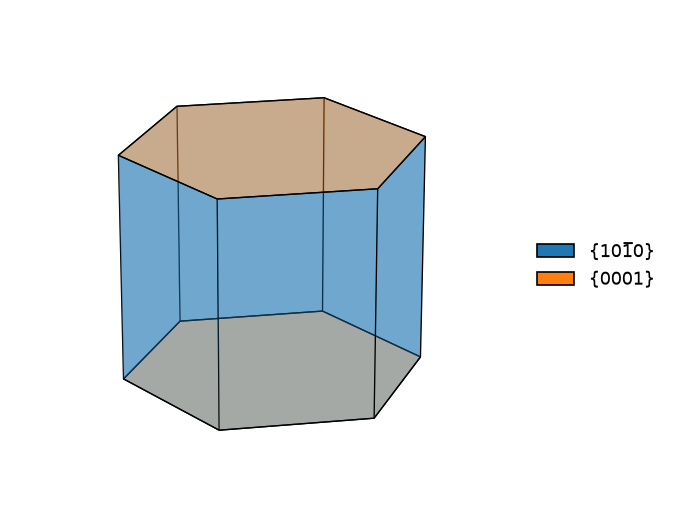
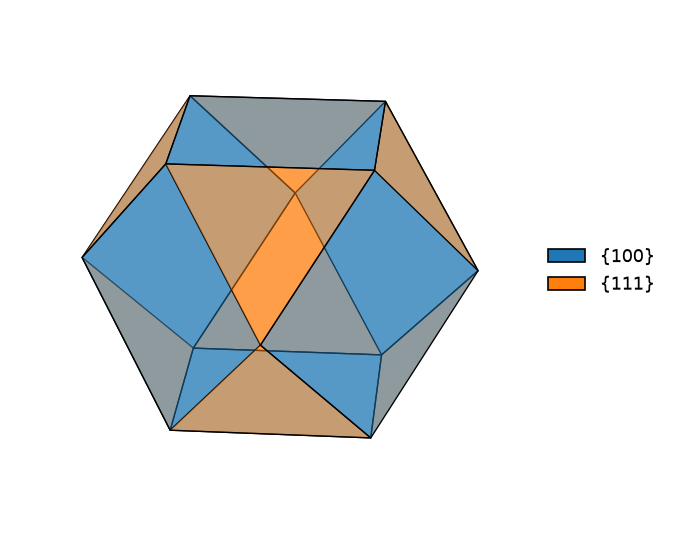
Construct a hexagonal prism without a data file, then build a cubic morphology from two families of lattice planes. Both examples use relative lengths; diameter sets the displayed size.
import matplotlib.pyplot as plt
from mtex import crystalFrame, crystalShape, Miller, cat, plot

hexagonal = crystalFrame('6/mmm', [3, 3, 4.7])
prism = crystalShape.hex(hexagonal)
prism.diameter = 2
print('Prism faces:', prism.numFaces)
plot(prism, faceAlpha=0.4, colored=True)

cubic = crystalFrame('m-3m')
normals = cat(Miller(1, 0, 0, cubic), 0.5*Miller(1, 1, 1, cubic))
truncatedCube = crystalShape(normals)
print('Truncated-cube faces:', truncatedCube.numFaces)
plot(truncatedCube, faceAlpha=0.5, colored=True)
plt.show()
The {100} planes bound the cube and the scaled {111} normals cut its corners. Changing a normal length changes its plane distance and therefore the relative prominence of that crystal form.
Prism faces: 8
Truncated-cube faces: 14
References
- J. Enderlein, A package for displaying crystal morphology, Mathematica Journal 7(1), 1997
See also
Miller, crystalShape.cube, crystalShape.hex, crystalShape.innerFace, CrystalShapes
Members
| albite | the albite crystal shape of the catalogue, in cs when given, MATLAB’s crystalShape.albite |
| amphibole | the amphibole crystal shape of the catalogue, in cs when given, MATLAB’s crystalShape.amphibole |
| analcime | the analcime crystal shape of the catalogue, in cs when given, MATLAB’s crystalShape.analcime |
| andalusite | the andalusite crystal shape of the catalogue, in cs when given, MATLAB’s crystalShape.andalusite |
| anorthite | the anorthite crystal shape of the catalogue, in cs when given, MATLAB’s crystalShape.anorthite |
| antigorite | the antigorite crystal shape of the catalogue, in cs when given, MATLAB’s crystalShape.antigorite |
| apatite | the apatite crystal shape of the catalogue, in cs when given, MATLAB’s crystalShape.apatite |
| aragonite | the aragonite crystal shape of the catalogue, in cs when given, MATLAB’s crystalShape.aragonite |
| augite | the augite crystal shape of the catalogue, in cs when given, MATLAB’s crystalShape.augite |
| biotite | the biotite crystal shape of the catalogue, in cs when given, MATLAB’s crystalShape.biotite |
| brucite | the brucite crystal shape of the catalogue, in cs when given, MATLAB’s crystalShape.brucite |
| calcite | the calcite crystal shape of the catalogue, in cs when given, MATLAB’s crystalShape.calcite |
| chromite | the chromite crystal shape of the catalogue, in cs when given, MATLAB’s crystalShape.chromite |
| clinochlore | the clinochlore crystal shape of the catalogue, in cs when given, MATLAB’s crystalShape.clinochlore |
| cordierite | the cordierite crystal shape of the catalogue, in cs when given, MATLAB’s crystalShape.cordierite |
| corundum | the corundum crystal shape of the catalogue, in cs when given, MATLAB’s crystalShape.corundum |
| crystalShape | construct a convex crystal morphology from symmetry-related lattice planes |
| CS | the crystal frame of the face normals, the frame the shape was built in |
| cube | construct a crystal bounded by the symmetry equivalents of the (100) plane |
| diameter | the largest distance between two vertices |
| diamond | the diamond crystal shape of the catalogue, in cs when given, MATLAB’s crystalShape.diamond |
| diopside | the diopside crystal shape of the catalogue, in cs when given, MATLAB’s crystalShape.diopside |
| dolomite | the dolomite crystal shape of the catalogue, in cs when given, MATLAB’s crystalShape.dolomite |
| E | the edges as pairs of vertex indices, every edge once |
| enstatite | the enstatite crystal shape of the catalogue, in cs when given, MATLAB’s crystalShape.enstatite |
| epidote | the epidote crystal shape of the catalogue, in cs when given, MATLAB’s crystalShape.epidote |
| exitDistance | measure the distance from the vertex mean to the surface along a ray |
| faceArea | area of each polygonal face in squared vertex-length units |
| faceCenter | mean of each face’s vertices as vector3d positions in the current frame |
| faceNormal | the outward unit normal of every face, where the shape stands |
| fluorite | the fluorite crystal shape of the catalogue, in cs when given, MATLAB’s crystalShape.fluorite |
| fluoriteComplex | the fluorite crystal shape of the catalogue, in cs when given, MATLAB’s crystalShape.fluoriteComplex |
| forsterite | the forsterite crystal shape of the catalogue, in cs when given, MATLAB’s crystalShape.forsterite |
| frame | the frame the vertices stand in: the crystal frame, or the specimen frame once an orientation has turned the shape |
| garnet | the garnet crystal shape of the catalogue, in cs when given, MATLAB’s crystalShape.garnet |
| gypsum | the gypsum crystal shape of the catalogue, in cs when given, MATLAB’s crystalShape.gypsum |
| halite | the halite crystal shape of the catalogue, in cs when given, MATLAB’s crystalShape.halite |
| hex | construct a hexagonal prism from prismatic and basal plane forms |
| ice_VI | the ice VI crystal shape of the catalogue, in cs when given, MATLAB’s crystalShape.ice_VI |
| ilmenite | the ilmenite crystal shape of the catalogue, in cs when given, MATLAB’s crystalShape.ilmenite |
| innerFace | cut a single crystal shape by a plane through the mean of its vertices |
| kyanite | the kyanite crystal shape of the catalogue, in cs when given, MATLAB’s crystalShape.kyanite |
| magnesite | the magnesite crystal shape of the catalogue, in cs when given, MATLAB’s crystalShape.magnesite |
| magnetite | the magnetite crystal shape of the catalogue, in cs when given, MATLAB’s crystalShape.magnetite |
| microcline | the microcline crystal shape of the catalogue, in cs when given, MATLAB’s crystalShape.microcline |
| monazite | the monazite crystal shape of the catalogue, in cs when given, MATLAB’s crystalShape.monazite |
| mtimes | |
| muscovite | the muscovite crystal shape of the catalogue, in cs when given, MATLAB’s crystalShape.muscovite |
| numFaces | the number of faces of the shape |
| numVertices | the number of vertices of the shape |
| olivine | the olivine crystal shape of the catalogue, in cs when given, MATLAB’s crystalShape.olivine |
| orthoclase | the orthoclase crystal shape of the catalogue, in cs when given, MATLAB’s crystalShape.orthoclase |
| plagioclase | the Plagioclase crystal shape of the catalogue, in cs when given, MATLAB’s crystalShape.plagioclase |
| plot | a crystal shape drawn as the polygons of its faces, in a 3D axes or onto a held map |
| plotInnerDirection | a crystal direction drawn as an arrow from the centre of a crystal shape to its surface |
| plotInnerFace | the section of a crystal shape by a lattice plane through its centre |
| plotSlipSystem | a slip system drawn inside a crystal shape: the slip plane through the centre with the slip direction as an arrow in it |
| plus | |
| quartz | the Quartz crystal shape of the catalogue, in cs when given, MATLAB’s crystalShape.quartz |
| repmat | n copies of the shape as a list |
| rotate | rotate crystal vertices, or place them in a specimen using an orientation |
| rutile | the rutile crystal shape of the catalogue, in cs when given, MATLAB’s crystalShape.rutile |
| size | the number of shapes, one unless the shape is a list of shapes |
| spinel | the spinel crystal shape of the catalogue, in cs when given, MATLAB’s crystalShape.spinel |
| staurolite | the staurolite crystal shape of the catalogue, in cs when given, MATLAB’s crystalShape.staurolite |
| subSet | select faces by outward normal in the original crystal coordinates |
| subsref | |
| tetr | construct a tetragonal prism from the (100) and (001) plane forms |
| times | |
| titanite | the titanite crystal shape of the catalogue, in cs when given, MATLAB’s crystalShape.titanite |
| topaz | the topaz crystal shape of the catalogue, in cs when given, MATLAB’s crystalShape.topaz |
| tourmaline | the tourmaline crystal shape of the catalogue, in cs when given, MATLAB’s crystalShape.tourmaline |
| volume | enclosed polyhedron volume in cubed vertex-length units, returned once per shape |
| zircon | the zircon crystal shape of the catalogue, in cs when given, MATLAB’s crystalShape.zircon |
| zoisite | the zoisite crystal shape of the catalogue, in cs when given, MATLAB’s crystalShape.zoisite |
Used on
CrystalShapeSmorf, CrystalShapes
MATLAB’s crystalShape_index
source
Citing this page.
This page is part of the documentation of
MTEX, a free and open
source MATLAB toolbox for analyzing and modeling crystallographic textures.
It was written by The MTEX Developers and is published at
https://mtex-toolbox.github.io/crystalShape_index_py.html.
If you use MTEX, or reuse text or figures from this page, in your research,
please cite
F. Bachmann, R. Hielscher, H. Schaeben: Texture Analysis with MTEX - Free and Open Source Software Toolbox, Solid State Phenomena 160 (2010), 63-68. 10.4028/www.scientific.net/SSP.160.63
BibTeX
@article{bachmann2010mtex,
  author  = {F. Bachmann and R. Hielscher and H. Schaeben},
  title   = {Texture Analysis with MTEX - Free and Open Source Software Toolbox},
  journal = {Solid State Phenomena},
  volume  = {160},
  pages   = {63-68},
  year    = {2010},
  doi     = {10.4028/www.scientific.net/SSP.160.63},
  url     = {https://doi.org/10.4028/www.scientific.net/SSP.160.63}
}
Other papers describing specific MTEX methods are listed under Publications — please cite the one that best fits your application. The MTEX source code is licensed under the GNU General Public License v2.0; the text and figures of this documentation are licensed under CC BY 4.0, which permits reuse — including by automated systems — provided The MTEX Developers and this page are credited.